
FlyWheel
FlyWheel

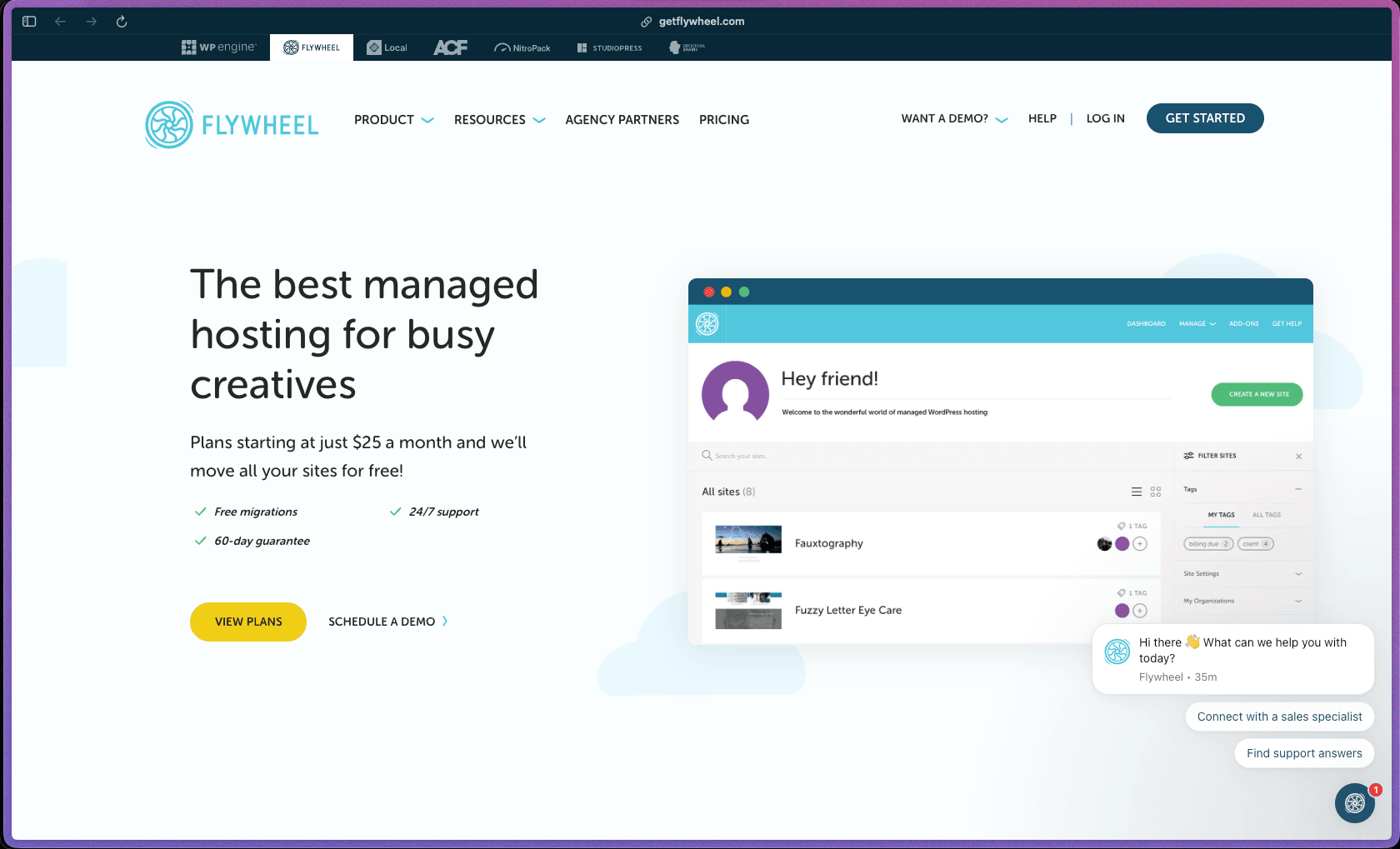
Flywheel's defining characteristic is that it was built specifically for creative agencies and freelancers—not just WordPress sites in general—which shows in features like one-click billing transfer to clients, team collaboration without shared password access, site cloning for rapid development, and a custom dashboard that avoids cPanel's complexity entirely. Founded in 2012 and now owned by WP Engine (one of the most established names in managed WordPress hosting), Flywheel combines a polished user experience with Google Cloud Platform infrastructure—bringing enterprise-grade stability to a platform designed for non-server-administrator creatives. A 4.4/5 Trustpilot score and 4.5/5 G2 rating from 39+ verified reviews consistently highlight the dashboard UI, onboarding experience, and support quality as standout strengths that make it worth the premium over generic shared hosting.
Flywheel uses a monthly subscription model tiered by traffic volume and site count—from a Tiny single-site plan for low-traffic sites up to Agency-tier multi-site plans covering 30+ websites, with all plans including free SSL, CDN, nightly backups, and free migrations. No free tier or permanently free plan is available, but a 14-day demo site (hosted without paying) allows site building before subscribing—and plans are backed by a 60-day money-back guarantee.
Flywheel offers a 60-day money-back guarantee—one of the longer refund windows in the managed WordPress hosting category, covering the first two months of any plan. Additionally, a free demo site can be built and hosted for up to 14 days before subscribing, allowing full evaluation of the platform's dashboard, workflow tools, and staging environment before any payment is required.
Flywheel is "mature/established"—founded in 2012, it has operated as a dedicated managed WordPress host for 13+ years, with a clear product identity (WordPress only, designer/agency focused) that has remained consistent throughout its history, suggesting a stable organizational roadmap rather than a pivot-prone startup. Acquisition by WP Engine (completed 2019) extended Flywheel's organizational stability and infrastructure capacity—giving the product access to WP Engine's engineering resources while maintaining its distinct brand and UX positioning for the creative agency market. The platform runs on Google Cloud Platform infrastructure, and the "Local by Flywheel" desktop app (now just "Local") for local WordPress development—which spun off as a widely adopted standalone product—demonstrates that the engineering team has broader technical depth beyond the core hosting product.
- Rated 4.5 out of 5 on G2 from 39+ verified reviews, with G2's AI assistant summarizing "helpful customer support," "ease of navigation," and "intuitive interface" as the three most commonly cited strengths across reviews.
- Rated 4.4 out of 5 on Trustpilot from approximately 350 reviews—a consistent, high positive signal for a premium managed WordPress host.
- Flywheel's official features page states over 70,000 creatives use the platform—noted here as a company-reported figure rather than a third-party verified number.
- Flywheel is owned by WP Engine, Inc.—one of the most recognized names in managed WordPress infrastructure—providing organizational backing and stability beyond a standalone boutique host.
- TechRadar, AllAboutCookies (2026), Elegant Themes, Jase Rodley (5-year, 50-site long-term review), and karveldigital.com have all independently reviewed Flywheel with broadly positive assessments—providing a strong base of third-party editorial coverage across multiple years.
- G2 reviewers specifically describe using Flywheel to manage 50+ client WordPress sites from a single dashboard, with one reviewer describing it as "one of the least painful web hosts" they've worked with in the context of client handoff and support.
- Server-side FlyCache caching handles WordPress page caching at the server layer—serving cached pages via NGINX without requiring a WordPress caching plugin, eliminating plugin-level cache configuration and reducing plugin conflicts caused by overlapping caching tools.
- All Flywheel sites run on VPS (virtual private server) infrastructure rather than shared hosting—ensuring no resource sharing with neighboring sites, which prevents the "noisy neighbor" performance degradation common on shared hosting accounts.
- Google Cloud Platform infrastructure powers all Flywheel hosting—providing Google's global network backbone, fault-tolerant data infrastructure, and low-latency routing between CDN edge nodes and origin servers.
- 7 data center location choices allow you to select the server physically closest to your primary audience during site setup—including options across the US, Europe, and Asia-Pacific—reducing baseline TTFB for geographically concentrated visitor bases.
- One-click staging sites create an isolated copy of a live site at a separate staging URL—allowing full theme, plugin, and content changes to be tested without risk before pushing updates live, available on all plans.
- Site cloning creates a duplicate of any existing site in one click—enabling rapid project starts from a pre-configured base site rather than rebuilding from scratch for each new client project.
- Free website migrations are handled by the Flywheel team at no charge regardless of how many sites you need to transfer—covering the file, database, and DNS migration process without requiring self-service migration plugin configuration.
- Nightly backups are stored off-site with one-click restore capability—allowing recovery to a point-in-time backup from the Flywheel dashboard without accessing a server, database tool, or opening a support ticket to restore.
- Free SSL certificates via Let's Encrypt are auto-provisioned and renewed for all sites on every plan—covering HTTPS encryption without purchasing commercial SSL certificates or manually managing certificate renewals.
- Plugin security alerts send email notifications when installed WordPress plugins have reported security vulnerabilities—giving site owners and agencies advance notice of plugin risks without running manual security scans.
- Free malware cleanup is included in Flywheel's security coverage—if a site is compromised, Flywheel's team handles malware removal at no additional charge rather than billing a remediation fee.
- Built-in site stats display traffic data within the Flywheel dashboard—showing visit counts, bandwidth, and traffic trends for each hosted site without requiring a separate analytics plugin for basic traffic monitoring.
- Demo sites allow a WordPress site to be built and hosted for free for up to 14 days—useful for client previews and new project development before the site needs to be subscribed to a live plan.
- SSH Gateway provides secure command-line access to any hosted site for advanced file management, WP-CLI usage, and deployment scripting—alongside SFTP access via a single unified login for all sites rather than separate credentials per site.
- Access logs, error logs, and slow query logs are available within the Flywheel dashboard—giving developers and agencies the diagnostic data needed to troubleshoot plugin conflicts, PHP errors, and performance bottlenecks without logging into a server console.
- CDN integration is available through the Flywheel dashboard—connecting to a CDN for static asset delivery from geographically distributed edge nodes to reduce load times for globally distributed audiences, without requiring separate CDN account setup.
- Google Analytics integration connects Google Analytics data to the Flywheel dashboard—displaying traffic insights from Google Analytics alongside hosting performance data in a unified view.
- Performance Insights is an optional add-on that provides deeper page speed monitoring and site speed recommendations—extending the basic built-in site stats toward a more actionable performance optimization dashboard.
- Local (formerly "Local by Flywheel") is a free standalone desktop application for local WordPress development that integrates with Flywheel hosting—enabling push/pull of sites between local development environments and live Flywheel-hosted sites without FTP or manual database export.
- Automatic nightly backup jobs run on a defined schedule without manual configuration—creating nightly off-site snapshots of all files and database content for each hosted site without requiring plugin-level backup tools or server-level cron setup.
- Plugin updates as a managed service (optional add-on) offload WordPress plugin maintenance to the Flywheel team—reviewing and applying plugin updates on your behalf to reduce the ongoing maintenance burden of managing plugin update cadences across multiple sites.
- SSL certificate auto-renewal manages Let's Encrypt certificate renewal automatically—preventing the certificate expiration and browser security warnings that unmanaged SSL certificates on other hosts require manual renewal to avoid.
- Free malware detection monitoring runs continuously against hosted sites—triggering free cleanup if malware is detected, without requiring manual scan scheduling or a paid security plugin to cover malware removal costs.
- Built-in site stats provide per-site traffic data (visits, bandwidth, historical trends) within the Flywheel dashboard—covering the basic traffic monitoring use case without installing an analytics plugin or configuring an external tracking service.
- Performance Insights (paid add-on) monitors page speed metrics and provides specific optimization recommendations—offering deeper speed analysis beyond the standard hosting dashboard for teams actively optimizing site performance.
- Error log, access log, and slow query log access within the dashboard provides developer-level diagnostic visibility—identifying PHP errors, request patterns, and slow database queries without requiring SSH access or a server monitoring tool.
- Data center selection at the site level allows each hosted site to be deployed in the server location that best serves its primary audience—meaning multi-site accounts can host different sites in different geographic regions within the same account.
- Plan upgrades are available at any time—allowing sites to be moved from lower-traffic plans to higher-traffic plans without migrating to a new server or experiencing site downtime during the plan transition.
- Billing via PayPal or credit card provides payment method flexibility—supporting both card-based billing and PayPal for teams with accounting workflows that require invoiceable PayPal billing.
- Plugin security alert notifications actively monitor installed plugins across hosted sites for known vulnerability reports—sending email alerts when a plugin used on a site has a published security disclosure, allowing preemptive updates before exploitation.
- Free malware cleanup covers the full remediation process if a hosted site is compromised—including file scanning, malware removal, and site restoration—at no additional charge beyond the existing hosting subscription.
- VPS-isolated hosting ensures each client site's resources and filesystem are not shared with other Flywheel customers—reducing the cross-account security risk that shared hosting environments carry when a neighboring account is compromised.
- Free SSL on all plans encrypts all data transmitted between visitors' browsers and the hosted sites—with automatic provisioning and renewal so SSL coverage cannot lapse due to missed renewal deadlines.
- Independent WordPress freelancers and designers who manage 3–10 client websites and want a single dashboard for staging, collaboration, and client billing handoff—without managing cPanel, SSH configurations, or plugin-based caching setups for each client.
- Creative agencies with a book of 10–30+ ongoing client WordPress projects who need staging environments, one-click site cloning for new project starts, per-site team access without shared credentials, and a clean client billing transfer workflow.
- WordPress developers who want a managed host where they can use WP-CLI via SSH, access error and slow query logs for debugging, and push/pull sites between local development (via Local) and live hosting—without managing a VPS or dealing with server administration.
- WordPress consultants who build and hand off sites to clients—Flywheel's billing transfer feature lets the consultant build the site, then transfer the hosting bill directly to the client's payment method from within the platform without an awkward billing conversation.
- Small businesses and bloggers who want managed WordPress hosting without server administration knowledge and are willing to pay a premium for a fully managed environment with nightly backups, free SSL, malware cleanup, and 24/7 WordPress-expert support.
- Use it for managing client WordPress sites as an agency or freelancer when you want a single dashboard covering staging, billing transfer to clients, team access per project, and site-level performance stats without logging into multiple cPanel accounts.
- Use it for safely deploying WordPress theme and plugin updates when you want a one-click staging environment to test changes before pushing live—so a breaking update never takes a client's production site offline unexpectedly.
- Use it for rapidly starting new client website projects when you want to clone an existing well-configured site as a starting template—rather than building each project from a fresh WordPress installation and reconfiguring your preferred plugins and settings.
- Use it for migrating a portfolio of existing client sites off shared or cPanel hosting when you want the Flywheel team to handle the file, database, and DNS migration for every site at no additional charge—without running migration plugins yourself or risking data loss during a manual transfer.
- Use it for building and previewing client websites before launch when you want to develop a full site under a Flywheel demo URL for up to 14 days without a live hosting subscription—presenting a finished preview to the client before the billing clock starts.
- Use it for hosting WordPress sites that need proactive security management when you want plugin vulnerability alerts, malware monitoring, and free malware cleanup included in the base plan—without purchasing a separate managed security service or WordPress security plugin.
- Managed cloud hosting service (WordPress only)—100% cloud-hosted on Google Cloud Platform infrastructure; no software installation required on the user's computer; server management is handled entirely by Flywheel's team; no cPanel access is provided by design.
- NGINX is the default web server stack across all Flywheel hosting accounts, with FlyCache (server-side page caching at the NGINX layer) handling WordPress page delivery without a WordPress-level caching plugin.
- All sites run on VPS (virtual private server) infrastructure—no shared hosting environments at any tier, ensuring dedicated resource allocation per account.
- 7 server location options covering the Americas, Europe, and Asia-Pacific regions—server location selected per site at time of creation or migration.
- CDN integration available within the platform dashboard for static asset delivery from distributed edge nodes.
- Local (formerly Local by Flywheel) is a free standalone Mac/Windows/Linux desktop application for local WordPress development with native push/pull integration to Flywheel-hosted sites—distributed separately from the hosting product.
- SSH Gateway and SFTP (single-login for all sites) are included for developer command-line access—supporting WP-CLI, Git-based deployments, and advanced file management workflows.
- WordPress-only platform—HTML sites, Node.js applications, non-WordPress CMSs, and custom application stacks cannot be hosted on Flywheel.
Flywheel's most direct competitors are Kinsta, WP Engine (its parent company), Pagely, and SiteGround—all competing in the managed WordPress hosting space with premium positioning. Flywheel's differentiation within this category is its explicit focus on the workflow needs of creative agencies and freelancers—specifically the billing transfer feature (transferring hosting invoicing to the client's payment method from within the dashboard), demo sites for client previews, and the clean site-handoff workflow that G2 reviewers specifically describe as a selling point for client-service businesses. Compared to WP Engine (its parent brand), Flywheel is generally positioned as the more approachable, designer-friendly entry point with a lighter dashboard UX, while WP Engine targets larger enterprise deployments—meaning some buyers eventually graduate from Flywheel to WP Engine as their hosting requirements grow.
- Support is available 24/7 via live chat and in-app ticket system on all plans; phone support is available Monday–Friday, 9am–5pm Central time for plans above $250/month; multiple G2 and Capterra reviewers describe the support team as genuinely helpful and knowledgeable about WordPress-specific issues rather than reading from a generic hosting script.
- A help documentation library is accessible directly within the Flywheel dashboard—covering site setup, staging workflow, billing transfer, SSH/SFTP access, CDN setup, plugin alerts, and common WordPress troubleshooting scenarios, structured for non-server-administrator creatives as the primary audience.
- No official community forum, Discord, or Facebook user group is prominently listed as a Flywheel support resource; community peer discussion occurs through general WordPress hosting forums and Reddit rather than a dedicated Flywheel community platform—though the 24/7 live chat availability reduces the community-forum dependency compared to hosts with lower support tier access.
- Flywheel is a WordPress-only hosting platform—HTML sites, static sites, non-WordPress CMSs, custom PHP applications, and Node.js projects cannot be hosted, meaning agencies with mixed CMS portfolios (WordPress and non-WordPress client sites) need a separate hosting arrangement for non-WordPress projects.
- Low-level server configuration access is intentionally restricted—Flywheel does not provide wp-config.php direct editing, .htaccess management, or custom NGINX/server rule configuration; G2 and G2 AI summary reviews specifically identify this as the most common dissatisfaction point among technically advanced users who want fine-grained server control.
- Email hosting is not included—Flywheel hosts websites only, and email for domains hosted on Flywheel must be configured separately through a third-party email provider (Google Workspace, Microsoft 365, Zoho, etc.); G2 reviewers explicitly flag this as a gap for clients expecting domain email to be bundled with hosting.
- Flywheel pricing scales with page view traffic rather than purely by site count—G2 reviewers note that high-traffic WooCommerce and/or large blog sites can become expensive at the $1-per-1,000-sessions overage rate, making Flywheel less cost-competitive for high-traffic e-commerce scenarios compared to flat-rate competitors.
Related Products
Recently Added!
Umso - Website Builder
Recently Added!
Porkbun

Recently Added!
Network Solutions
Recently Added!
Namecheap

Liquid Web

Recently Added!
InterServer
Recently Added!
InstaWP
Recently Added!
InMotion Hosting
Recently Added!
Hover
Products With Lifetime Deals
Recently Added!
FluentForms

Recently Added!
Divi Theme

Recently Added!
ConvertPro

Recently Added!
CartFlows

Recently Added!
Bullet Proof Security

Recently Added!
WP Booking Calendar

Recently Added!
BeaverBuilder

Recently Added!
Avada

Recently Added!
Independent Analytics

You Recently Viewed These
Recently Viewed
BitFlows

Recently Viewed
Amelia

Recently Viewed
Dynamic.ooo

Recently Viewed
Microthemer & Amender

Recently Viewed
LifterLMS

Recently Viewed
Masteriyo

Recently Viewed
Zynith SEO

Recently Viewed
Wrike

Recently Viewed
WPMU Dev

Recently Viewed
wpDataTables

Recently Viewed
WP Booking Calendar
Recently Viewed
Webflow
