
CrazyEgg
CrazyEgg

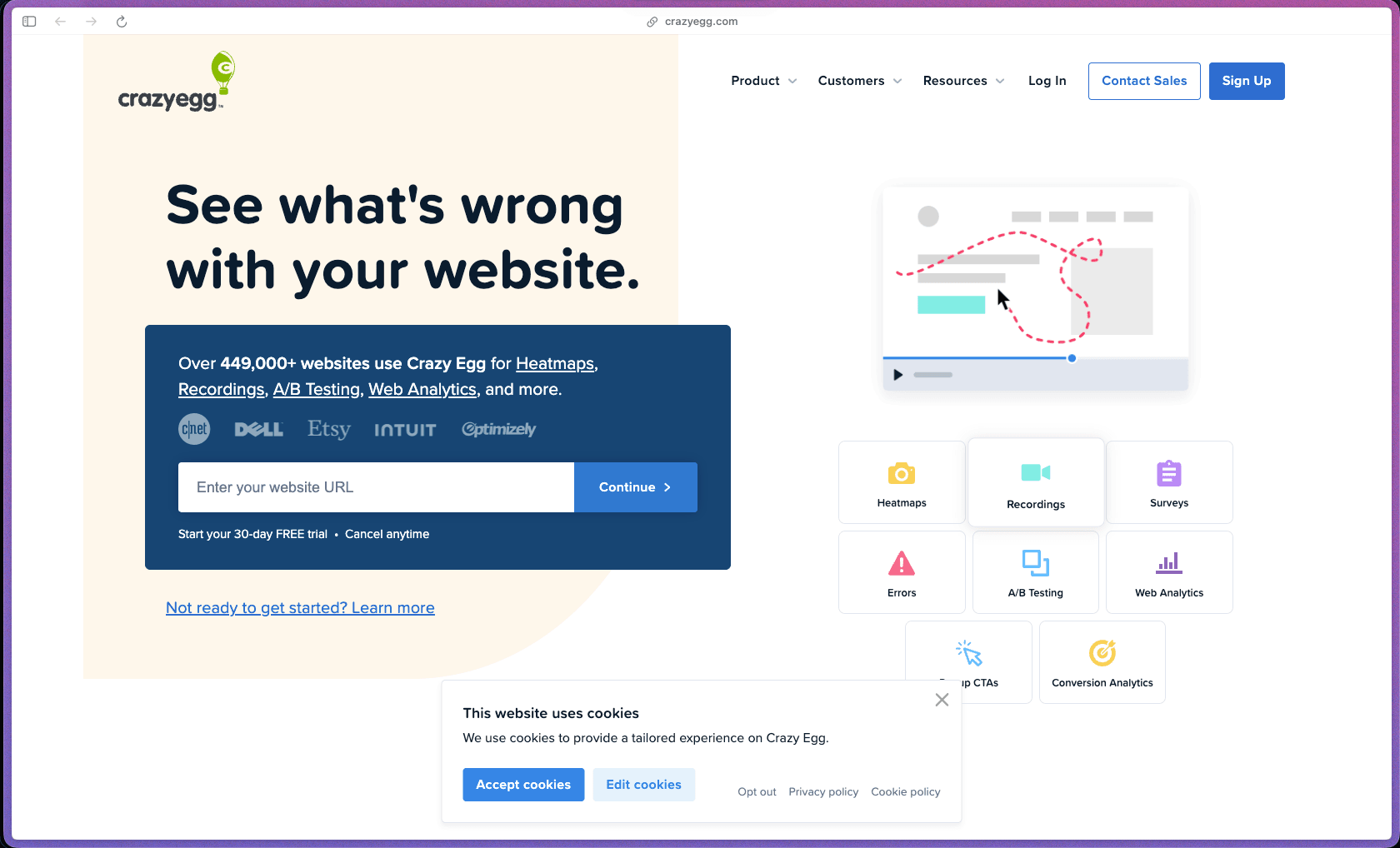
Crazy Egg was one of the first tools to popularize the heatmap concept and has been continuously developed since 2006, giving it a longer track record and more refined feature set than most newer entrants in the behavior analytics category. It combines heatmaps, session recordings, A/B testing, surveys, and web analytics in one subscription—reducing the number of separate tools needed for a complete conversion optimization workflow at a small-to-mid-market price point. With 449,000+ websites on the platform, it has proven adoption across a wide range of industries and site types, from e-commerce to content sites.
Crazy Egg uses a monthly or annual subscription model with four tiers (Starter, Plus, Pro, Enterprise), priced by the number of tracked pageviews per month—meaning your plan cost scales with how much traffic your site receives. No permanent free plan is offered, but a 30-day free trial is available on all plans.
Crazy Egg offers a 30-day free trial on all plans, allowing full access to the platform before charging begins. No credit card details beyond standard plan signup are required to initiate the trial based on available information; refund policy for paid subscriptions post-trial is not prominently specified on the official site—buyers should review terms or contact support before committing to a paid plan.
Crazy Egg is "mature/established"—co-founded in 2006, it is one of the original commercial heatmap tools and has been in continuous operation for close to 20 years, predating most of its current competitors. The product has evolved well beyond its original heatmap-only feature set to include session recordings, surveys, A/B testing, and an AI-assisted analytics dashboard, indicating sustained investment and product development rather than a static legacy tool. With 449,000+ websites tracked and multiple active pricing tiers including an Enterprise level, the platform demonstrates the kind of scale and commercial infrastructure consistent with a mature, well-resourced product.
- Rated 4.2 out of 5 on G2 from a substantial base of verified reviewer ratings, with users consistently highlighting ease of setup, intuitive interface, and heatmap clarity as primary positives.
- Crazy Egg reports 449,000+ active websites tracked on the platform, one of the larger reported active user counts in the dedicated heatmap and CRO tools category.
- Crazy Egg was co-founded in 2006 by Neil Patel and Hiten Shah—both well-known figures in the digital marketing and SaaS community—giving the product strong founder-driven credibility within the marketing tools space.
- Software Advice reviewers describe the tool as easy to install and intuitive, specifically praising its focus on doing heatmaps and behavior analytics well rather than trying to cover every analytics use case.
- Third-party coverage from WPBeginner, Elegant Themes, and multiple CRO-focused review publications confirms sustained editorial attention from the WordPress and marketing communities over many years.
- Heatmaps generate a color-coded overlay of your page showing exactly where visitors click most frequently, letting you see at a glance which areas attract attention and which go ignored—without interpreting raw click data tables.
- Scroll maps show what percentage of visitors reach each vertical point on a page, revealing where the majority stop scrolling and helping you identify whether key CTAs, pricing, or content are positioned below the point where most visitors disengage.
- Confetti reports break down click data by traffic segment—filtering heatmap dots by referral source, device type, browser, geography, or campaign—so you can compare how different audience groups interact with the same page element.
- Overlay reports show the precise click count and percentage of total clicks each individual page element received, making it easy to quantify which buttons, links, and images are generating engagement and which are being overlooked.
- List reports present click data in a sorted spreadsheet-style table, allowing you to rank all clickable elements on a page by engagement volume and export the data for further analysis or reporting.
- Session recordings capture complete video replays of individual visitor browsing sessions—including mouse movements, scrolls, clicks, and form interactions—giving you a first-person view of where visitors get confused, hesitate, or drop off.
- A/B testing (called Experiments) lets you create and run page variations—testing alternative headlines, button colors, layouts, or copy—and measures which version converts better, with the ability to declare a winner and apply it without needing a developer to deploy code changes.
- An AI-automated analysis feature reviews your collected heatmap and analytics data and generates a plain-language summary of key findings and suggested improvements, reducing the time required to manually interpret reports before deciding what to change.
- On-site surveys let you embed short questions directly on specific pages to collect qualitative feedback from visitors—asking about their intent, confusion points, or satisfaction at the moment they're on the page rather than in a separate email survey later.
- A web analytics dashboard aggregates core traffic metrics—pageviews, sessions, bounce rate, conversion goals, traffic sources—into a single view alongside behavioral data, reducing the need to switch between Crazy Egg and a separate analytics tool for basic performance monitoring.
- Goals and conversion tracking lets you define specific success actions (form submissions, button clicks, page visits) and measure how different traffic segments and page variants perform against those goals over time.
- Error tracking identifies JavaScript errors occurring on your site during visitor sessions and surfaces them in the recording dashboard, helping you catch technical issues that may be silently causing conversions to fail.
- Crazy Egg installs via a single JavaScript snippet that works on any website platform—WordPress, Shopify, Squarespace, Wix, custom HTML, or any CMS—making it platform-agnostic with no dependency on a specific tech stack.
- A dedicated WordPress plugin is available, allowing one-click tracking script installation on WordPress sites without manually adding code to your theme files.
- Shopify integration allows e-commerce tracking on Shopify stores, enabling heatmap and session recording data collection for product pages, cart, and checkout flows.
- HubSpot, Google Analytics, and other marketing platform integrations are supported to allow Crazy Egg data to connect with your existing analytics and CRM infrastructure.
- AI-automated analysis continuously reviews incoming heatmap, scroll, and analytics data and generates summarized insight reports automatically—so you're not waiting for a team member to manually review every session recording or heatmap to surface what matters.
- Automatic snapshot scheduling lets you configure recurring heatmap captures at defined intervals so your behavioral data refreshes regularly without manually triggering each new data collection period.
- A/B test winner deployment pushes the winning variant live directly from within the Crazy Egg interface once a test reaches statistical significance—without requiring a developer to manually update the live page code.
- The unified dashboard displays traffic metrics, heatmap summaries, recording counts, A/B test results, and conversion goal performance in a single view with exportable data tables, reducing the need to pull reports from multiple tools for a performance review.
- Filtering and segmentation across all report types allows you to isolate behavioral data by device (desktop vs. mobile vs. tablet), traffic source, geography, date range, and user type—so a drop in mobile conversions can be investigated separately from desktop behavior without affecting the overall report view.
- Exportable reports allow heatmap images, click data tables, and session recording lists to be downloaded and shared with clients or stakeholders outside the Crazy Egg account, useful for agencies presenting optimization findings in client reports.
- Conversion goal tracking reports compare performance against defined success metrics over time, allowing you to measure the impact of site changes on conversion rates before and after implementing A/B test winners or manual optimizations.
- Snapshot targeting lets you configure exactly which pages are tracked, including URL pattern matching, so you can focus your heatmap data collection on the highest-priority pages (landing pages, product pages, checkout) rather than collecting undifferentiated data across an entire site.
- Tag filtering in session recordings lets you label and sort sessions by specific behaviors (e.g., sessions that included an error, sessions from a specific campaign) making it faster to find relevant recordings without watching every session from scratch.
- A/B test variations can be edited using a visual point-and-click editor that lets you modify text, swap images, or rearrange elements directly on a preview of your live page—without writing HTML or CSS.
- Crazy Egg's tracking script can be configured to mask sensitive form fields in session recordings—preventing passwords, payment card numbers, or other personal data from being captured in replays—addressing a key privacy concern common to session recording tools.
- Specific compliance certifications (GDPR, SOC 2, CCPA) are not prominently detailed on the public-facing product or pricing pages; buyers operating in regulated environments or with specific data residency requirements should request Crazy Egg's data processing documentation before activating tracking on sites collecting personal data.
- E-commerce store owners on Shopify or WooCommerce who want to see exactly where visitors drop off on product and checkout pages, and want to A/B test changes without waiting for a developer to deploy them.
- In-house marketing teams at SaaS companies running landing page experiments who need a CRO tool that combines behavioral data and A/B testing in one subscription without paying separately for a heatmap tool and an experimentation platform.
- Digital marketing agencies managing website optimization for multiple clients who need a professional-grade tool with exportable visual reports (heatmaps, scroll maps) to present in client optimization reviews.
- Growth or product managers at content-driven sites who want to understand which page layouts and content structures retain reader attention before committing to a site redesign or CMS migration.
- Solo founders or small teams running paid traffic campaigns who need to confirm that landing page visitors are engaging with key elements (headlines, CTAs, forms) as intended before scaling ad spend.
- Use it for identifying where paid traffic drops off on a landing page when you're running ads and seeing clicks but low conversions, and you need to see whether visitors are scrolling past your CTA, ignoring your form, or clicking on non-clickable elements.
- Use it for running a structured A/B test on a key conversion page when you want to test an alternative headline or layout and measure the actual conversion rate impact before making the change permanent.
- Use it for diagnosing mobile UX issues when your mobile conversion rate is significantly lower than desktop and you need session recordings filtered to mobile visits to understand what's happening differently on smaller screens.
- Use it for optimizing page length and content placement when you need to know what percentage of visitors reach your pricing section, testimonials, or secondary CTA—and whether repositioning them higher would improve engagement.
- Use it for collecting qualitative exit intent data when you want to understand why visitors are leaving a specific page without converting, using an on-page survey triggered before they navigate away.
- Use it for presenting CRO findings to a client when you need visually clear, exportable heatmaps and scroll maps that communicate where a page is underperforming without requiring the client to interpret raw analytics numbers.
- Cloud-hosted SaaS platform; tracking is implemented via a single JavaScript snippet that works on any website regardless of CMS or platform—WordPress, Shopify, Squarespace, Webflow, custom HTML, and others.
- A dedicated WordPress plugin is available for one-click tracking installation on WordPress sites.
- Compatible with Shopify, HubSpot, Google Analytics, and other marketing and analytics platforms for data cross-referencing and integration.
- All heatmap and recording data is stored in Crazy Egg's cloud infrastructure; data retention windows vary by plan tier (3 months on Starter, 1–2 years on higher tiers).
- No native desktop or mobile app is listed; the platform is accessed via web browser dashboard on all operating systems.
Crazy Egg competes in the behavior analytics and CRO tools space alongside Hotjar, Microsoft Clarity, and FullStory—but its clearest differentiator is the inclusion of a full no-code A/B testing tool alongside behavioral analytics, which Hotjar and Clarity do not offer natively. Microsoft Clarity is a free alternative that covers heatmaps and recordings but lacks A/B testing, surveys, and AI-automated insight summaries—making Crazy Egg a stronger fit for teams that want to move from insight to experimentation within one platform rather than connecting multiple tools. With nearly 20 years of operation and 449,000+ sites on the platform, it brings a level of institutional reliability and feature maturity that newer entrants in the category haven't yet matched.
- Support is available via email and in-app help; G2 and third-party reviewers describe support as responsive and helpful, with no widespread reported patterns of slow response or unresolved tickets in recent review data.
- Documentation is maintained in a comprehensive help center covering installation, heatmap configuration, A/B testing setup, session recording filters, goal tracking, and integrations; Crazy Egg's blog also publishes CRO-focused educational content alongside product documentation.
- No dedicated community forum, Discord, or user group is prominently listed; primary support resources are the official help center and direct email/chat contact, supplemented by a substantial library of third-party tutorials and reviews from the wider CRO and marketing community.
- Pricing scales by monthly tracked pageview volume, meaning costs increase as your traffic grows—teams with high-traffic sites may find the per-pageview cost model adds up quickly at the Plus and Pro tier thresholds.
- Session recording and snapshot (heatmap) counts are capped per plan tier; lower-tier plans may run out of recording or snapshot capacity on high-traffic sites before the billing period resets, requiring plan upgrades to avoid data gaps.
- No permanent free plan is available—only a 30-day trial—meaning teams on a tight budget who want ongoing heatmap access without a subscription have limited options within the Crazy Egg ecosystem.
- Specific GDPR and data compliance certification details are not prominently disclosed on public product pages, which may create a due diligence step for teams in the EU or regulated industries before enabling tracking.
Related Products
Recently Added!
Wrike

Recently Added!
TimeDoctor

Recently Added!
RingCentral

Recently Added!
Retable

Recently Added!
Parallels Desktop

Recently Added!
Pabbly Connect

Recently Added!
Nuelink

Recently Added!
Kit (formerly ConvertKit)
Recently Added!
Intercom

Products With Lifetime Deals
Recently Added!
FluentForms

Recently Added!
Divi Theme

Recently Added!
ConvertPro

Recently Added!
CartFlows

Recently Added!
Bullet Proof Security

Recently Added!
WP Booking Calendar

Recently Added!
BeaverBuilder

Recently Added!
Avada

Recently Added!
Independent Analytics

You Recently Viewed These
Recently Viewed
BitFlows

Recently Viewed
Amelia

Recently Viewed
Dynamic.ooo

Recently Viewed
Microthemer & Amender

Recently Viewed
LifterLMS

Recently Viewed
Masteriyo

Recently Viewed
Zynith SEO

Recently Viewed
Wrike
Recently Viewed
WPMU Dev

Recently Viewed
wpDataTables

Recently Viewed
WP Booking Calendar
Recently Viewed
Webflow
