
Clicky
Clicky

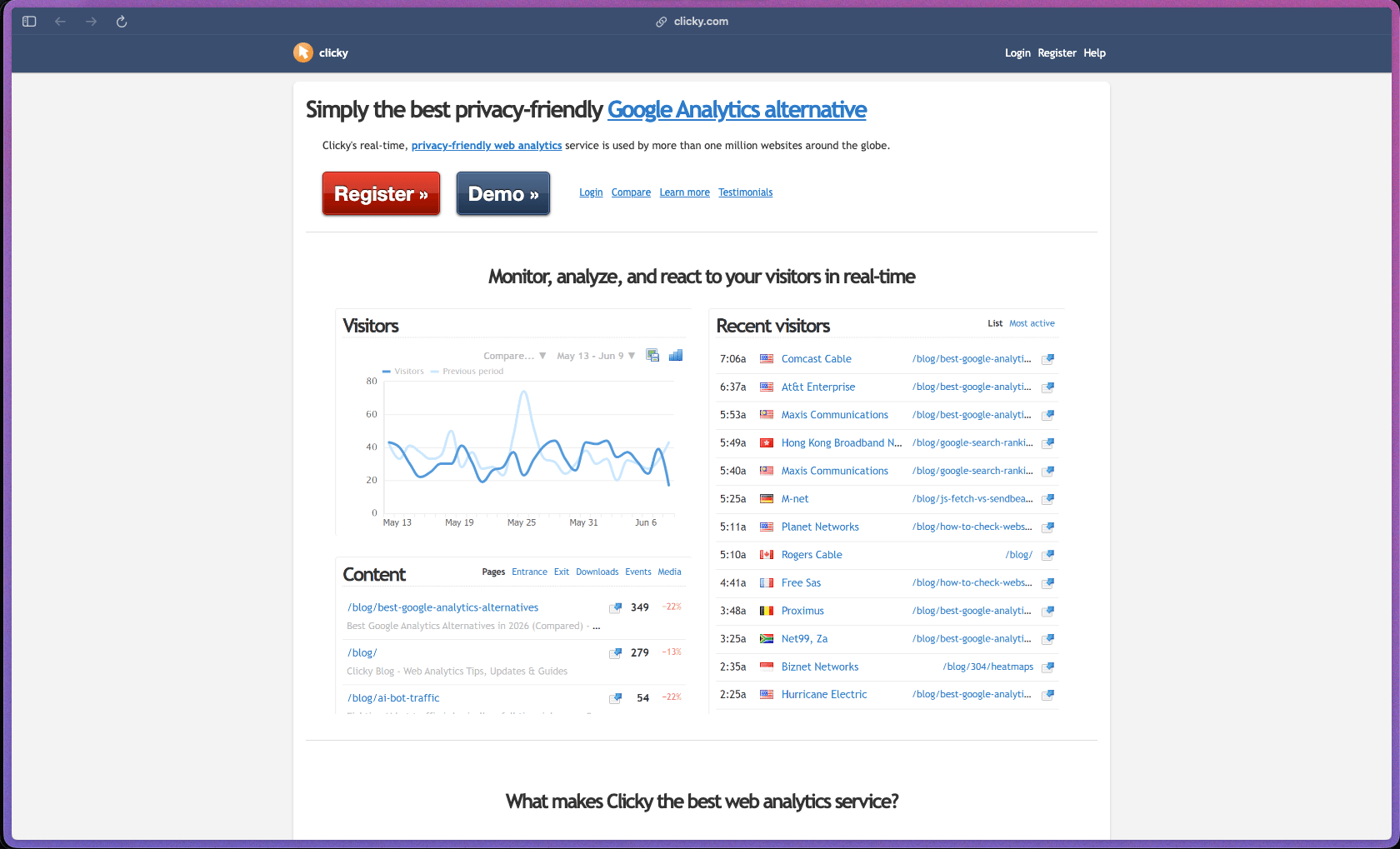
Clicky has been running since 2006 and tracks over one million websites, which gives it a maturity and reliability track record that many newer analytics tools can't match. It gives you real individual visitor-level data in real time—something Google Analytics doesn't do well—at a price point that's accessible for solo founders and small teams. The built-in uptime monitoring, heatmaps, and cookie-free GDPR compliance mean you get more than just pageview charts from one subscription.
Clicky offers a free plan (limited to 1 site and 3,000 daily page views) with paid monthly or annual subscription tiers for higher traffic and more features; annual billing offers a meaningful discount over month-to-month pricing. A separate white-label reseller pricing structure is available for agencies who want to rebrand and resell Clicky analytics to clients.
Clicky offers a 21-day free trial of its premium features with no credit card required; after the trial, accounts automatically roll onto the free plan rather than being charged if no upgrade is selected. Refund policy for paid plans is not specified on the official site.
Clicky is "mature/established"—founded in 2006 and operating continuously for nearly 20 years, it predates most of its current competitors and has accumulated a user base of over one million websites. The platform has added modern features (AI bot analytics, reverse proxy tracking, video analytics, session recordings) while maintaining its core real-time visitor log model, indicating steady ongoing development rather than stagnation. That said, independent reviewers note the interface feels dated compared to newer analytics tools, which is a consistent trade-off comment worth noting for buyers who prioritize modern UI design.
- Rated 4.5 out of 5 on G2 from 31 verified reviews, with reviewers consistently highlighting the real-time visitor data and the Spy feature as standout capabilities not easily matched by Google Analytics.
- Clicky reports over 1,000,000 websites actively using the platform as of the current homepage, making it one of the longer-running independent analytics services in the market.
- The Clicky WordPress plugin has been available in the WordPress.org repository since at least 2010 with regular updates through 2025, indicating long-term platform support for WordPress users.
- Independent reviewers from 2026 note Clicky as a well-established, low-cost Google Analytics alternative with a track record going back to 2006—one of the few analytics platforms still operating independently after two decades.
- Real-time visitor logs show every individual visitor, page view, download, and JavaScript event as they happen—giving you a live picture of who is on your site right now, not a delayed summary.
- The Spy feature provides a live feed of active visitors on your site with their location, referrer, and current page, making it easy to watch traffic behavior in real time during campaigns or content launches.
- Heatmaps are generated at both the page level and the individual visitor level, and can be filtered by segment—so you can compare how traffic from different sources actually interacts with a page.
- Bot detection and blocking filters out known bots and referrer spam automatically before they reach your reports, so your traffic data reflects real human visits rather than inflated counts.
- Uptime monitoring checks your website from multiple global locations and sends an alert when your site goes offline, combining analytics and basic server monitoring in one tool.
- Goal tracking lets you define specific conversion actions (form submissions, downloads, page visits) and measure how many visitors complete them, with real-time tracking as goals are met.
- Advanced filtering and segmentation lets you combine multiple conditions (referrer + page count + location + device) to drill into specific visitor subsets without creating separate views or segments manually.
- Path analysis shows the sequence of pages a visitor viewed during their session, helping you understand how users navigate through your site and where they exit.
- Campaign tracking supports UTM-style parameters to measure traffic from paid and email campaigns separately from organic or direct sources.
- Split testing support lets you compare two versions of a page and measure which drives better outcomes based on real visitor behavior.
- Custom data logging lets you attach identifiers (such as a username or customer ID) to visitor sessions, which is useful for connecting analytics data to known customers in a support or e-commerce context.
- AI bot categorization separates traffic originating from AI chatbots and AI-domain crawlers into its own category, giving site owners visibility into how much of their traffic is AI-generated versus human.
- A WordPress plugin integrates Clicky tracking automatically into self-hosted WordPress sites and displays a stats overview inside the WordPress admin dashboard, with support for HTML5 and YouTube video tracking.
- A full REST API allows developers to pull any Clicky report data programmatically for custom dashboards, external reporting tools, or automated workflows.
- The on-site analytics widget embeds a live visitor count directly on any page of your website so you can view stats and launch heatmaps without leaving the page you're viewing.
- Plugins for additional CMS platforms and installation guides for manual tracking code setup are available in Clicky's plugin directory, covering setups beyond WordPress.
- SheerSEO integration is referenced by G2 reviewers as a useful connection for combining Clicky traffic data with SEO rank tracking workflows.
- Automated email reports can be scheduled to deliver traffic summaries to your inbox at defined intervals, so you get a regular snapshot without logging in to the Clicky dashboard.
- Uptime alerts send automatic notifications when your site goes offline, with monitoring running from multiple global server locations around the clock without manual setup.
- Trend analysis overlays let you compare any metric against the same period one day, week, month, or year earlier—making it easy to spot whether traffic patterns are improving or declining over time.
- Engagement reports measure how visitors interact with your content beyond pageviews, including time on site, scroll depth, and interactions with video and audio elements.
- Video and audio analytics track user interactions with HTML5 media elements as well as embedded YouTube and Vimeo players, showing play rates, completion rates, and viewer drop-off.
- The Big Screen mode presents key metrics in a large-format display suitable for office dashboards or team screens that need a live traffic overview visible at a glance.
- Saved segments allow you to store frequently used filter combinations as named segments and reapply them with one click across any report, rather than rebuilding the same filter set repeatedly.
- Favorites let you pin specific reports or views for quick access, so the dashboards most relevant to your workflow are immediately available when you log in.
- Sub-user accounts let you add additional users with access to specific sites in your Clicky account, which is useful for agencies sharing reports with clients or teams with multiple site managers.
- Clicky is GDPR-compliant by default—it does not use tracking cookies and does not collect personal data in its standard configuration, which means most sites using Clicky do not need to display a cookie consent banner.
- An optional higher-data mode allows full IP address logging and additional session data for security or anti-fraud use cases, as explicitly permitted under GDPR Recital 47—giving users the choice between privacy-first and security-first data collection depending on their use case.
- Reverse proxy tracking routes all tracking beacons through your own domain's paths rather than a third-party URL, which ensures analytics data is collected even from visitors using ad blockers that block third-party scripts.
- Solo bloggers and content publishers running WordPress sites who want to see real-time individual visitor data without relying on Google Analytics and without displaying a cookie consent banner.
- Small business owners who want a straightforward traffic dashboard with uptime monitoring included, so they don't need separate tools for analytics and server monitoring.
- Digital agencies managing multiple client websites who want to track each site's traffic under one account and optionally white-label the analytics interface for client reporting.
- E-commerce and SaaS founders who want to attach customer IDs to visitor sessions so support and product teams can look up individual user behavior directly within the analytics tool.
- Privacy-conscious site owners in the EU who need a GDPR-compliant analytics solution that doesn't require cookie banners and doesn't share visitor data with third parties.
- Use it for monitoring a content marketing campaign in real time when you want to watch individual visitors arrive from a specific referrer source and track which pages they read without waiting for aggregated daily reports.
- Use it for tracking conversion goals on a landing page when you want to see how many visitors from each traffic source complete a specific form submission or download action.
- Use it for understanding heatmap behavior by segment when you want to compare how paid search visitors interact with a page differently than organic visitors—filtered at the visitor segment level.
- Use it for setting up uptime alerts on a small business website when you want to be notified immediately if the site goes offline without paying for a separate uptime monitoring tool.
- Use it for GDPR-compliant analytics on an EU-facing website when you want accurate traffic data without a cookie consent popup and without sending visitor data to Google's servers.
- Use it for client reporting at a small agency when you want to provide clients access to their own site's stats under your brand using Clicky's white-label reseller plan.
- Cloud-hosted SaaS platform accessible via any modern web browser; no software installation or server configuration required—tracking is implemented by adding a small JavaScript snippet to your site's HTML.
- A WordPress plugin is available on WordPress.org for self-hosted WordPress sites, handling tracking code installation automatically alongside a stats widget in the admin dashboard.
- Plugins and integration guides are available for other CMS platforms through Clicky's plugins directory; manual tracking code installation is supported on any platform that allows adding custom JavaScript.
- A full REST API is available for developers building custom reporting dashboards, pulling data into third-party tools, or automating account and site management.
- White-label plans include a custom domain, logo, company name, and optional UI color customization—plus an API for automating user and site registration in a reseller setup.
Clicky sits between free privacy-invasive tools like Google Analytics and more expensive dedicated analytics platforms, filling a niche as a low-cost, privacy-first analytics option with individual visitor-level real-time data—something Google Analytics 4 deliberately removed. Compared to newer privacy-focused alternatives like Plausible or Fathom, Clicky offers more granular individual visitor data, heatmaps, uptime monitoring, and white-label reseller options, though with a notably older interface that some users find dated. The combination of analytics, heatmaps, uptime monitoring, and white-label reselling in one flat-rate subscription makes Clicky particularly cost-effective for agencies and small teams who would otherwise pay separately for each capability.
- Support is provided via a help documentation center and FAQ system at clicky.com/help; the documentation covers features, common questions, plugin setup, and API reference in a structured format that independent reviewers describe as sufficient for self-service setup.
- Direct support contact options (email or ticket) are available for paid plan holders; live chat is not listed as a support channel on the official site, and response time indicators are not publicly specified.
- Community support through third-party forums and blog tutorials exists but is modest relative to larger analytics platforms—Clicky does not appear to maintain an active public community forum or Discord as of available information.
- The free plan is limited to 1 site and 3,000 daily page views, which is restrictive for any site with meaningful traffic—most real-world use cases will require a paid plan.
- G2 and independent reviewers consistently note the interface feels visually dated compared to newer analytics tools, which can make the platform feel less polished for teams accustomed to modern dashboard design.
- Native integrations with third-party marketing and analytics tools are limited compared to platforms like Google Analytics—G2 reviewers specifically call out the narrow integration library as a drawback for teams with complex martech stacks.
- Twitter/X analytics and keyword monitoring is listed as a feature, but its current functionality depends on third-party API access that has historically been restricted or changed by the platform; buyers relying on this feature should verify its current status before committing.
Related Products
Recently Added!
Wrike

Recently Added!
TimeDoctor

Recently Added!
RingCentral

Recently Added!
Retable

Recently Added!
Parallels Desktop

Recently Added!
Pabbly Connect

Recently Added!
Nuelink

Recently Added!
Kit (formerly ConvertKit)
Recently Added!
Intercom
Products With Lifetime Deals
Recently Added!
FluentForms

Recently Added!
Divi Theme

Recently Added!
ConvertPro

Recently Added!
CartFlows

Recently Added!
Bullet Proof Security

Recently Added!
WP Booking Calendar

Recently Added!
BeaverBuilder

Recently Added!
Avada

Recently Added!
Independent Analytics

You Recently Viewed These
Recently Viewed
BitFlows

Recently Viewed
Amelia

Recently Viewed
Dynamic.ooo

Recently Viewed
Microthemer & Amender

Recently Viewed
LifterLMS

Recently Viewed
Masteriyo

Recently Viewed
Zynith SEO

Recently Viewed
Wrike
Recently Viewed
WPMU Dev

Recently Viewed
wpDataTables

Recently Viewed
WP Booking Calendar
Recently Viewed
Webflow
