
ClickUp
ClickUp

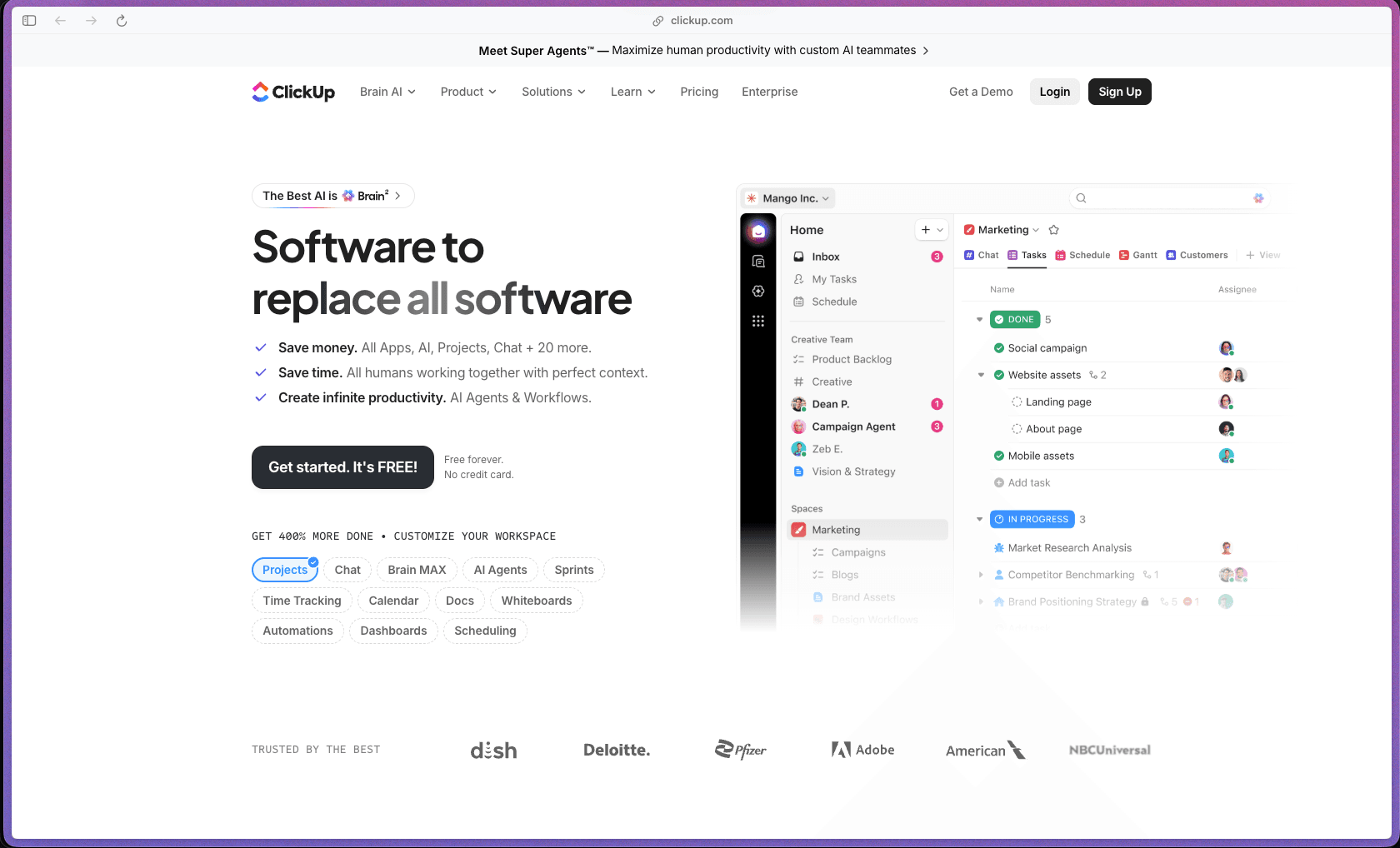
ClickUp's free plan is one of the most capable in the project management category—it includes unlimited tasks, unlimited members, Kanban boards, sprint management, collaborative docs, and calendar view with no time limit, making it a genuinely useful starting point rather than a restricted teaser. The paid tiers add Gantt charts, time tracking, dashboards, goals, resource management, and unlimited automations at a per-user price that stays competitive with narrower tools that cover only one of those functions. It holds the #1 ranking in 11 G2 categories (Spring 2025) with 12,600+ verified reviews at 4.6/5—a breadth of recognition that reflects adoption across multiple team types and use cases.
ClickUp uses a freemium per-user subscription model with a genuinely functional Free Forever plan and paid tiers (Unlimited, Business, Business Plus, Enterprise) billed monthly or annually—annual billing provides a significant discount over monthly. AI features are available as a separate add-on subscription with usage-based metered credits for advanced AI actions (Super Agents, AI Fields, AI Automations), layered on top of the base plan pricing.
ClickUp does not advertise a money-back guarantee or paid free trial on the official pricing page; the Free Forever plan serves as the no-time-limit evaluation path with no credit card required to sign up and start using it. Refund policy for paid plans is not specified on the public pricing or help pages—buyers should contact ClickUp support directly to confirm the refund policy before upgrading.
ClickUp is "mature/established"—founded in 2017 and now in its ninth year of operation, it has accumulated 12,600+ G2 reviews, an 85% Fortune 500 penetration rate, and consistent G2 top-ranking across 11 categories, indicating a well-established commercial product rather than a tool still finding product-market fit. The platform has undergone significant architectural evolution—from a task manager into a unified workspace covering chat, docs, AI agents, whiteboards, time tracking, resource management, and goals—while maintaining backward compatibility for existing workspaces and pricing structures. A known security disclosure in April 2026 (a configuration exposure affecting some customer email addresses) is documented in public channels, indicating the product operates at a scale where security incidents are reported publicly and represent a practical enterprise evaluation consideration.
- Rated 4.6 out of 5 on G2 from 12,600+ verified reviews as of June 2026, ranking #1 in 11 G2 categories in the Spring 2025 reports and placing in the top 4% of all products on the G2 platform.
- ClickUp is used by 85% of the Fortune 500, including documented customers such as Home Depot, Autodesk, Mayo Clinic, Fortinet, Tenable, and Rakuten.
- The official ClickUp customer stories page reports 3 million+ tasks automated by ClickUp AI Agents across the platform's active user base.
- ClickUp was named to the Forbes Cloud 100 list for two consecutive years (2022 and 2023), reflecting recognition in the broader SaaS industry alongside its G2 standing.
- TrustRadius reviewers have given ClickUp an 8.2 out of 10 from 1,500+ verified reviews, with reviewers noting feature depth and customization as primary strengths.
- TheirStack data identifies 28,500+ companies using ClickUp across industries ranging from advertising and IT services to biotech, real estate, financial services, and e-learning.
- Tasks with unlimited customization let teams define custom statuses, priorities, assignees, start/due dates, time estimates, dependencies, subtasks, and checklists per task—supporting simple to-do tracking and complex multi-step project work from the same object type.
- 15+ view types (List, Board, Gantt, Calendar, Timeline, Table, Activity, Mind Map, Workload, Map, and others) allow every team member to see the same underlying data in the format that makes most sense for their role—without duplicating the data or maintaining separate tracking systems.
- ClickUp Docs creates wiki-style documentation, meeting notes, project briefs, and SOPs directly inside the workspace—with real-time collaborative editing, nested pages, and direct task linkage, removing the need for a separate documentation tool like Notion or Confluence for teams already in ClickUp.
- ClickUp Chat is a native messaging layer within the workspace (available from the Unlimited plan) that connects conversations directly to tasks, docs, and projects—reducing context switching between a separate messaging app and the project management tool.
- Goals and Portfolio Management (Unlimited and above) track measurable team objectives against key results, with automatic progress rollup from connected tasks—supporting OKR workflows or goal-based planning without a separate goals tracking tool.
- Native Time Tracking (Unlimited and above) lets team members log hours directly on tasks with manual entry or a one-click timer, and rolls up into billable time reports for agencies or project managers tracking time against client budgets.
- Whiteboards provide an infinite visual canvas for brainstorming, diagramming, and planning sessions—with sticky notes, connectors, shapes, and the ability to turn whiteboard items directly into ClickUp tasks.
- Dashboards (Business and above with advanced cards) build custom reporting views with widgets for task status, workload distribution, sprint velocity, time tracking, and other metrics—providing a team or executive-level snapshot without manually compiling data from multiple lists.
- Sprint Management is included on the Free plan, covering sprint creation, sprint points, burndown tracking, and velocity reporting—supporting agile software development teams without requiring a paid upgrade to access basic sprint tooling.
- Resource Management (Unlimited and above) provides visibility into team capacity and workload, showing who has availability and who is overloaded across open tasks—useful for project managers assigning work to already busy teams.
- ClickUp Brain (AI assistant) is available on all plans with trial access and as a paid AI add-on, providing AI-generated task summaries, auto-fill for task descriptions, AI writing in Docs, AI search across the entire workspace, and AI-powered notetaker for meetings.
- AI Super Agents automate multi-step tasks across the workspace—assigning tasks, prioritizing work, generating content, and running automation chains—with metered credit consumption for advanced agent actions.
- Multiple Workspaces can be created per account for completely separate team environments, each with its own billing and plan tier.
- 1,000+ native integrations are available across the Unlimited plan and above, covering Slack, HubSpot, Google Drive, Dropbox, GitHub, GitLab, Figma, Zoom, Loom, Calendly, Toggl, Harvest, Salesforce, Zendesk, Jira, Trello, Asana, and many others—reducing manual handoffs between the tools a team already uses.
- Zapier and Make.com connectivity extends ClickUp's integration library to thousands of additional apps outside the native list, enabling custom automation flows for use cases not covered by native integrations.
- GitHub, GitLab, and Bitbucket integrations link code commits and pull requests directly to ClickUp tasks, giving development teams a single place to track feature work alongside the code changes associated with it.
- Slack integration brings ClickUp task notifications into Slack channels and allows creating, updating, and commenting on ClickUp tasks directly from Slack messages without switching to the ClickUp interface.
- Email in ClickUp (Unlimited and above) lets users send and receive emails directly from within a task, keeping client or stakeholder communication in context alongside the task without forwarding emails into the workspace manually.
- Two-way calendar sync with Google Calendar and Outlook Calendar keeps ClickUp due dates and scheduled tasks visible in external calendars and allows calendar-created events to appear in ClickUp.
- ClickUp Automations (available from the Business plan with 5,000 automations/month; 250,000/month on Enterprise) let teams set up trigger-based workflows—such as automatically assigning a task when its status changes, notifying a team member when a due date arrives, or moving a task to the next sprint when marked complete—without writing code.
- Webhooks and Automation Integrations (Business and above) enable external systems to trigger actions in ClickUp (and vice versa) based on events, supporting custom workflow automation pipelines that extend beyond ClickUp's native automation library.
- AI Automations (AI add-on) use AI agents to make context-aware automation decisions—such as automatically assigning work based on content analysis or prioritizing tasks based on team capacity—rather than just rule-based triggers.
- Recurring tasks can be scheduled to auto-create on configurable intervals (daily, weekly, monthly, custom), removing the need to manually re-create standing tasks for routine team workflows.
- Status change automations can trigger email notifications, status updates in connected integrations, or team member assignments automatically when a task moves through a defined workflow stage.
- Dashboards with advanced cards (Business and above) support time tracking reports, task completion velocity, workload charts, sprint burndown, goal progress rollup, and custom widget configurations—providing reporting without requiring a separate BI tool for project-level data.
- Time Tracking Reports (Unlimited and above) roll up logged hours per team member, per project, or per client across any date range, supporting billing, payroll, or project profitability analysis without exporting data to a spreadsheet.
- Activity Views (Business and above) show a chronological log of all changes made to tasks within a space or list, providing an audit trail for team leads reviewing what work was done and when.
- Goals progress tracking provides automatic rollup from linked tasks and target metrics, showing how far along teams are on objectives without requiring manual progress updates from individual contributors.
- Custom Statuses let each Space, Folder, or List define its own task workflow stages—meaning a software development list can use "Backlog → In Review → QA → Done" while a marketing calendar uses "Ideation → Draft → Approved → Published," all within the same workspace.
- Custom Fields (unlimited on Unlimited plan and above) allow teams to add any data type to tasks—dropdowns, ratings, currency, phone numbers, formulas, URLs, progress bars, and others—so ClickUp can capture the specific data points a team needs without workarounds.
- Custom Views save personalized filter, sort, and grouping configurations at the personal or shared level, so each team member can access the tasks most relevant to them without changing the underlying list structure for everyone else.
- Custom Roles and Permissions (Business Plus and above) allow administrators to define exactly what different user roles can see, edit, or manage within the workspace—useful for agencies providing clients with limited read-only access or for organizations with separate department access requirements.
- Custom Branding and White Labeling (Enterprise) allows the ClickUp interface to be presented under the organization's own brand, supporting agencies and enterprise teams that use ClickUp as a client-facing project portal.
- Two-Factor Authentication (2FA) is included on the Free Forever plan, providing an account security baseline without requiring a paid upgrade.
- SAML SSO and SCIM Provisioning (Enterprise) supports enterprise identity providers for centralized authentication, automated user provisioning and de-provisioning, and role synchronization from an organization's IdP.
- Session Management and Audit Log (Enterprise) provide visibility into active user sessions and a full log of account-level changes, supporting security review and compliance audit requirements.
- HIPAA compliance is available via MSA on Enterprise plans for teams operating in healthcare environments, with Data Residency options for organizations with geographic data storage requirements.
- A publicly disclosed security configuration exposure in April 2026 (a homepage configuration file revealing 959 customer emails and internal feature flags without authentication) was reported externally and is a known incident for enterprise security evaluation teams to review.
- Small to mid-size software development teams managing sprint-based workflows who want tasks, GitHub/GitLab integration, sprint tracking, docs, and team chat in a single workspace without paying for separate tools for each function.
- Marketing agencies managing content production and client deliverables for 5–20 clients who need per-client workspaces, workload visibility across the team, and time tracking for billing—without managing multiple separate project management accounts.
- Operations and project management teams at mid-size companies (50–500 employees) who need Gantt charts, resource management, cross-team dependencies, and executive dashboards to track delivery across concurrent projects.
- Remote-first teams of 3–20 people who want to replace Slack for communication, Notion for documentation, Asana or Trello for tasks, and Google Sheets for status reporting—consolidating into one tool to reduce subscription sprawl.
- Enterprise PMO and operations teams at Fortune 500-scale organizations that need SAML SSO, SCIM, custom roles and permissions, audit logs, HIPAA support, and data residency alongside project management capabilities.
- Use it for managing a software development team's sprint workflow when you need a Kanban board, sprint planning, GitHub integration for commit tracking, velocity reporting, and team docs all accessible in the same workspace without switching between Jira and Confluence.
- Use it for running a marketing content calendar when you need to plan editorial topics, assign writers, track draft and review status, manage approvals, and store content briefs in linked docs—with a calendar view so the whole team can see the publishing schedule at a glance.
- Use it for managing client project delivery at an agency when you need per-client spaces, workload dashboards to see who is at capacity, time tracking for billing, and client-facing portals where clients can view task status without accessing internal workspace data.
- Use it for cross-functional product launches when multiple teams (product, marketing, engineering, sales enablement) need to track dependencies between their workloads and coordinate delivery milestones on a shared timeline without running separate project trackers per team.
- Use it for tracking company-wide OKRs when you want objective and key result progress to roll up automatically from linked tasks, giving leadership a live view of goal progress without collecting manual status updates each week.
- Use it for consolidating a remote team's scattered tools when your team is paying separately for Asana, Slack, Notion, and Calendly and you want to evaluate whether a single ClickUp subscription covers enough of those use cases to reduce tool overhead and context switching.
- Cloud-hosted SaaS platform accessible via web browser (any modern browser, no installation required), with native iOS and Android mobile apps for task management and notifications on the go.
- Desktop apps are available for Mac and Windows, providing a dedicated application window with offline access to cached tasks and docs when not connected to the internet.
- Chrome browser extension available for quick task capture, time tracking, and screenshot capture from any webpage without opening the full ClickUp web app.
- 1,000+ native integrations on paid plans include Slack, HubSpot, Google Drive, Dropbox, GitHub, GitLab, Figma, Zoom, Loom, Calendly, Toggl, Harvest, Salesforce, Zendesk, Jira, Trello, and Asana; Zapier and Make.com extend connectivity further.
- Enterprise plan includes Enterprise API with higher rate limits for organizations building custom integrations between ClickUp and internal systems.
- Webhooks (Business and above) allow external systems to send and receive real-time event data from ClickUp, supporting custom integration pipelines beyond the native library.
ClickUp positions itself as a consolidation platform—the pitch is that one ClickUp subscription can replace separate tools for tasks (Asana/Jira), docs (Notion/Confluence), chat (Slack), goals (Lattice/Ally), and whiteboards (Miro/Mural), with cost savings from reduced per-tool subscriptions as the practical argument. Compared to Asana or Jira, ClickUp offers a broader feature set at lower per-user pricing, but with a steeper learning curve and more configuration overhead—G2 and TrustRadius reviewers frequently cite feature depth as both ClickUp's biggest strength and the source of its most common frustration (the initial complexity of setting it up to fit a specific team's workflow). Compared to Notion (which skews toward documentation and flexible databases), ClickUp is more opinionated about task and project management structure, with stronger Gantt, sprint, time tracking, and resource management capabilities out of the box.
- 24/7 live chat support is included on all plans including Free Forever, making it one of few project management tools that provides live support at the free tier; priority support is added at the Business Plus level and dedicated success management at Enterprise.
- ClickUp's help documentation at help.clickup.com is comprehensive, covering every feature with structured guides, video walkthroughs, and a searchable knowledge base; independent reviewers describe it as one of the more thorough documentation libraries in the project management category.
- The ClickUp community (community.clickup.com) is active with questions, template sharing, and feature discussions; beyond the official community, a large ecosystem of third-party consultants, template marketplaces, YouTube tutorial channels, and certifications exists for teams that want structured onboarding support beyond self-service documentation.
- ClickUp's feature depth creates a steep initial learning curve—G2, TrustRadius, and independent reviewers consistently describe the platform as overwhelming for new users, with setup time to configure custom statuses, views, fields, and automation to fit a team's workflow being a meaningful upfront investment before the platform pays off.
- The Free Forever plan includes only 60MB of total storage, which is functionally restrictive for teams that attach files to tasks regularly; Unlimited storage requires upgrading to the Unlimited paid plan.
- Automation is gated: meaningful automation (5,000 runs/month) requires the Business plan; the Free and Unlimited plans include only 100 automations/month, which is very limited for teams planning to automate routine workflow steps at scale.
- The AI features (ClickUp Brain and Super Agents) are available as a separate paid add-on layered on top of the base plan subscription, and advanced AI actions consume metered Super Credits at variable rates depending on complexity—making the total AI cost unpredictable for teams planning to use AI automation heavily.
Related Products
Recently Added!
Wrike

Recently Added!
TimeDoctor

Recently Added!
RingCentral

Recently Added!
Retable

Recently Added!
Parallels Desktop

Recently Added!
Pabbly Connect

Recently Added!
Nuelink

Recently Added!
Kit (formerly ConvertKit)
Recently Added!
Intercom
Products With Lifetime Deals
Recently Added!
FluentForms

Recently Added!
Divi Theme

Recently Added!
ConvertPro

Recently Added!
CartFlows

Recently Added!
Bullet Proof Security

Recently Added!
WP Booking Calendar

Recently Added!
BeaverBuilder

Recently Added!
Avada

Recently Added!
Independent Analytics

You Recently Viewed These
Recently Viewed
BitFlows

Recently Viewed
Amelia

Recently Viewed
Dynamic.ooo

Recently Viewed
Microthemer & Amender

Recently Viewed
LifterLMS

Recently Viewed
Masteriyo

Recently Viewed
Zynith SEO

Recently Viewed
Wrike
Recently Viewed
WPMU Dev

Recently Viewed
wpDataTables

Recently Viewed
WP Booking Calendar
Recently Viewed
Webflow
