
Icegram
Icegram

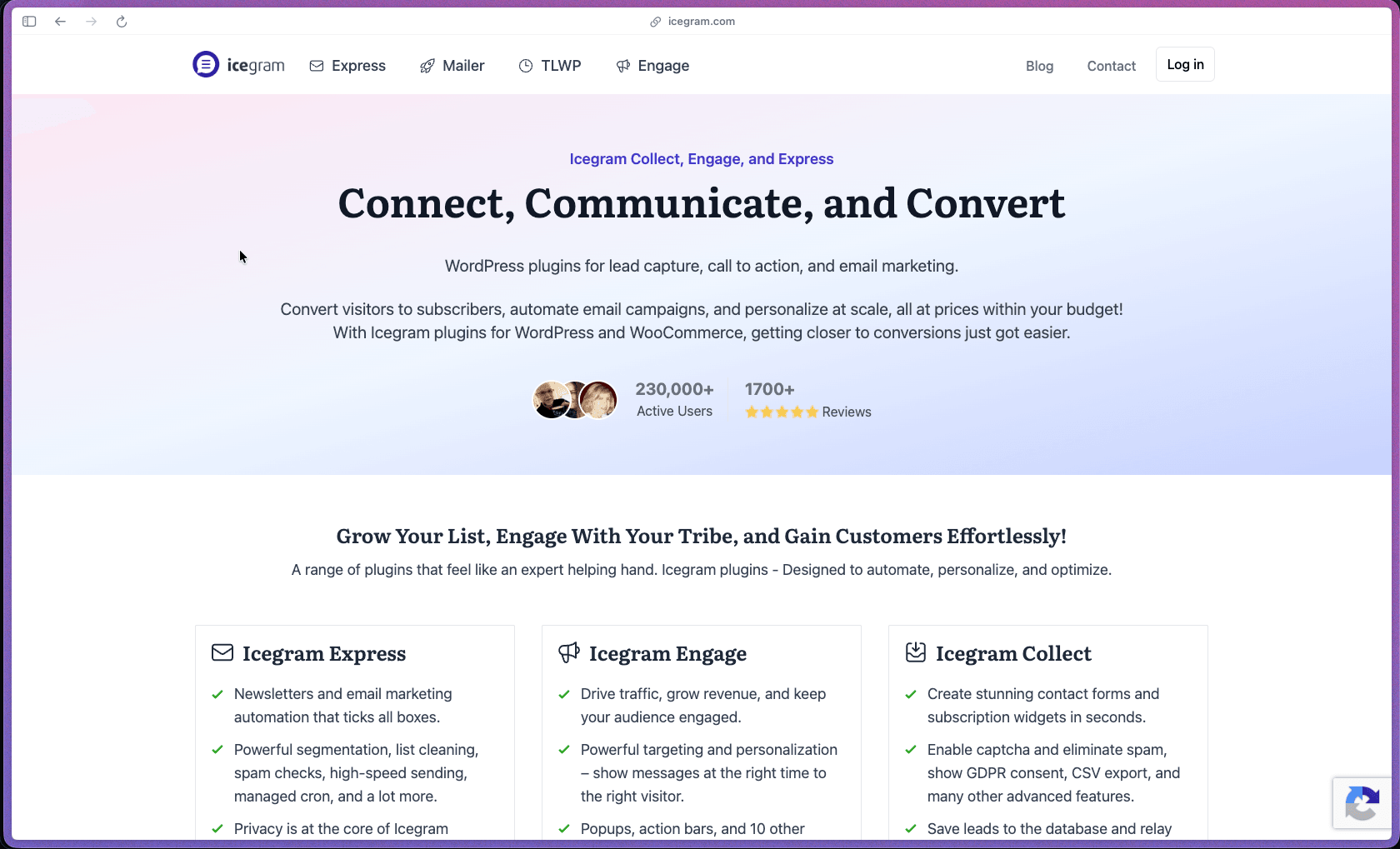
Icegram's three-plugin suite covers the full WordPress lead generation and email marketing workflow — on-site engagement messages (Engage), subscriber management and email sends (Express), and form-based lead collection (Collect) — all self-hosted within the WordPress installation rather than sending data to a third-party SaaS platform. For WordPress site owners who want to own their subscriber list data, avoid a recurring SaaS fee, and keep the entire workflow within their WordPress dashboard, the combination of a free starting point and affordable annual plans makes this a practical option to evaluate before committing to Mailchimp, ConvertKit, or OptinMonster. Icegram has been active since at least 2014 (as evidenced by the domain registration and WordPress.org install history), with over 2.5 million total downloads across the Engage plugin alone and a combined user review base of 1,700+ documented on the official site.
Icegram uses a freemium model with annual subscription upgrades — all three plugins (Engage, Express, Collect) have a permanently free tier on WordPress.org, with Pro and Max paid plans billed annually per plugin, covering one or multiple sites depending on the selected tier. No monthly billing option is documented; all paid plans are annual subscriptions.
Icegram offers a 30-day money-back guarantee on all paid plans — buyers who are unsatisfied within 30 days of purchase can request a full refund, as documented on the Icegram pricing pages. The free tier for all three plugins is available indefinitely on WordPress.org without a credit card, providing a no-risk evaluation period for the core feature set before committing to an annual paid plan.
Icegram is "mature/established" — the plugin suite has been active since 2014, accumulated 2.5 million+ total downloads for the Engage plugin alone, and has operated through a documented rebranding (the suite was previously named Icegram Rainmaker for the forms product, with product names standardized to Engage/Express/Collect as part of a recent rebrand). The product is maintained by a small dedicated team that has supported the suite for over a decade, with WordPress.org plugin pages showing ongoing update history and active support forum responses — providing evidence of continued maintenance investment rather than an abandoned codebase. One honest context note: at 20,000+ active installs, Icegram Engage sits well below the install counts of dominant WordPress popup competitors like OptinMonster and Popup Maker — it is a mature, stable plugin but not a category leader by market share, which is worth factoring in when evaluating ecosystem support breadth.
- Icegram Engage is rated 4.7 out of 5 on WordPress.org based on 368 verified reviews — with 20,000+ active installations and 2.5 million total downloads across its WordPress.org history.
- Icegram Express (email subscribers plugin) has been in use for over ten years according to a verified WordPress.org support review from June 2025 — with a reviewer citing 10 years of use and praising sub-24-hour support response times for issue resolution.
- Icegram's official customer reviews page documents 1,700+ user testimonials — with the plugin suite having operated since at least 2014, providing over a decade of user feedback accumulation.
- PluginTracker.io confirms Icegram Engage at 4.7/5 from 368 WordPress.org reviews and 20,000+ active installs as of the most recent tracked data.
- A WordPress.org support thread from April 2026 documents an active long-term user who confirms the developers are "generally responsive to suggestions and fix emergent [issues]" — providing a recent (2026) third-party signal of ongoing plugin maintenance.
CORE (Icegram Engage — Popups and On-Site Messages):
- 12 message types are available for on-site visitor communication — covering popups, floating action bars, toast notifications, messengers, full-screen overlays, inline blocks, tabs, sidebars, interstitials, ribbons, sticky bars, and badges, giving site owners more message placement flexibility than a basic popup-only tool.
- 120+ pre-built campaign templates are available for immediate use — covering lead magnet delivery, newsletter sign-up prompts, content upgrade gates, exit intent retention messages, announcement bars, and WooCommerce discount coupon delivery without starting from a blank canvas.
- Two-step opt-in support reduces form abandonment by presenting a button click before the email form appears — a proven pattern that increases subscription rate on opt-in campaigns compared to showing the email field immediately.
- Behavioral targeting rules allow messages to be shown based on visitor actions — including exit intent (triggering a message when the user moves to close the tab), scroll depth, time on page, page count per session, and new vs. returning visitor status.
- Geographic targeting (Max plan) allows messages to be personalized based on the visitor's detected country or region — covering e-commerce stores that want to show location-specific offers, delivery messaging, or region-relevant content without a separate personalization plugin.
- A/B split testing (Max plan) allows two message variants to be served to different visitor segments — measuring which headline, design, or offer converts better before committing the winner to full traffic, covering conversion optimization without a separate testing tool.
CORE (Icegram Express — Email Marketing and Newsletters):
- Subscriber management is handled entirely within the WordPress dashboard — storing subscriber lists, contact data, and opt-in source records on the site's own database rather than a third-party email marketing platform, covering site owners who want full data ownership without an external subscription.
- Email newsletter broadcasts allow site owners to compose and send HTML or plain-text newsletters to their subscriber list directly from WordPress — without a Mailchimp or ActiveCampaign account for basic newsletter delivery.
- Blog post notification emails are sent automatically when a new post is published — alerting subscribers to new content without manually creating and sending a separate email each time, covering bloggers and content sites where consistent new-post notification drives repeat traffic.
- WooCommerce abandoned cart recovery (paid plans) sends automated follow-up emails to customers who add items to their cart but don't complete checkout — covering one of the highest-ROI WooCommerce email automation use cases without a separate WooCommerce email plugin subscription.
- Trigger-action automation workflows allow email sequences to be configured based on subscriber events — covering welcome series, opt-in confirmation follow-ups, and behavior-triggered email drips without a full marketing automation platform subscription.
CORE (Icegram Collect — Forms and Lead Management):
- Customizable contact forms and subscription forms cover lead capture without the Icegram Engage popup layer — providing standalone form placement on pages and posts for audiences where embedded forms perform better than triggered popups.
- Lead filtering and export tools allow collected contacts to be segmented and downloaded — covering the scenario where lead data needs to be transferred to a CRM, email platform, or analytics tool outside the WordPress environment.
- CAPTCHA security integration protects forms from bot submissions — covering the standard spam protection requirement for any publicly accessible WordPress lead capture form.
- Icegram Express supports integration with multiple external email service providers and SMTP relays — covering MailChimp, ActiveCampaign, AWeber, Mad Mimi, HubSpot, Campaign Monitor, and generic SMTP configuration, allowing subscribers captured in WordPress to sync to an existing external ESP list.
- Icegram Mailer is a companion WordPress plugin for basic email deliverability — providing simple outbound email sending from the WordPress site without requiring SMTP configuration, covering sites that don't have a dedicated transactional email service set up.
- Icegram Engage integrates with Icegram Express opt-in forms natively — allowing popup and action bar messages to display subscription forms that feed directly into the Express subscriber list, connecting the on-site engagement layer with the email marketing layer without third-party glue.
- Third-party webhook support (Collect free plan) allows form submission data to be sent to external services — covering Zapier-style integrations or custom CRM connections without a paid external automation tool for basic webhook use cases.
- Automated blog post notification emails in Express send to subscribers each time a post is published — eliminating the manual email composition step for content-driven sites that need consistent subscriber communication without weekly newsletter work.
- WooCommerce abandoned cart email sequences (Express paid plans) automatically send a series of recovery emails at configured intervals after cart abandonment — covering the full follow-up sequence (initial reminder, second touch, final offer) without manual monitoring of abandoned carts.
- Trigger-action workflow automation in Express allows enrollment in an email sequence to be triggered by specific subscriber events — covering welcome series, lead magnet delivery sequences, and re-engagement campaigns configured once and running automatically for every new subscriber who meets the trigger condition.
- Campaign scheduling in Engage allows on-site messages to be set to display only within a defined date and time range — covering flash sales, limited-time offers, event promotions, and holiday campaigns that should start and stop at specific times without manual activation and deactivation.
- Impression and conversion reporting in Engage (Pro and Max plans) tracks the number of times each message was displayed alongside the number of times visitors clicked or converted — covering the core campaign performance data needed to assess whether a specific message type or offer is working.
- Top-5 message and campaign performance summaries (Engage Pro plan) surface the highest-performing active messages and campaigns — providing a quick-scan performance view without navigating individual message analytics.
- Email campaign performance tracking in Express covers delivery counts, open rates, and click tracking — covering the standard email marketing metrics needed to evaluate newsletter and automation campaign effectiveness from within the WordPress dashboard.
- Reporting features on the free tier of both Engage and Express are limited — the free Engage plan does not include impression vs. conversion reporting, and advanced campaign analytics require a Pro or Max plan upgrade; buyers who need detailed behavioral reporting from day one should plan for a paid plan rather than starting on free.
- 100+ premium design themes for Engage message types (Pro and Max plans) cover a range of visual styles, color schemes, and layout options — allowing campaigns to match the site's brand without custom CSS work, covering the most common design customization need for a non-developer audience.
- Custom CSS access is available for buyers who want full design control over message appearance — covering developers and designers who need to match a specific brand identity beyond the available theme options.
- Display rules in Engage allow precise control over which pages, post types, categories, tags, user roles, and devices each message appears on — covering the scenario where a specific offer should only appear on product pages for logged-out users on mobile, rather than appearing sitewide.
- Post-CTA click behavior (Engage Pro and Max) controls what happens after a visitor interacts with a message — covering redirect to a thank-you URL, display of a follow-up message, or form display, allowing multi-step lead capture flows to be configured without separate redirect logic.
- Animation effects for message display and hiding (Engage Max plan) cover entrance and exit transitions for popup and notification message types — allowing more visually engaging message presentations for campaigns where visual treatment contributes to conversion rate.
- Bloggers and content creators running self-hosted WordPress sites who want to grow an email subscriber list using popups, inline opt-in forms, and automatic new-post notification emails — without paying a monthly Mailchimp or ConvertKit fee for a list under a few thousand contacts.
- WooCommerce store owners who need abandoned cart email recovery, subscriber list building via exit-intent popups, and newsletter broadcasting — using Icegram's three-plugin suite to cover the full email marketing and on-site engagement workflow within WordPress without a separate e-commerce email platform subscription.
- Small business owners managing a WordPress site who want to display time-limited promotional announcements, coupon code offers, or event notifications via action bars and popup messages — using Engage's campaign scheduling and display targeting to show the right message to the right visitor without a developer.
- WordPress developers and freelancers managing multiple client sites who need a cost-effective lead generation and email marketing toolkit that runs fully within WordPress — using the multi-site Max plan to deploy Engage and Express across up to three client sites without per-site SaaS subscriptions.
- Nonprofit or content-driven organizations operating budget-constrained WordPress sites who want a free starting point for email list building and on-site messaging — using the free tiers of all three Icegram plugins to cover basic lead capture, subscriber management, and popup messaging before evaluating paid plan upgrades.
- Use it for building an email subscriber list from WordPress site traffic when you want exit-intent popups, inline opt-in forms, and automatic blog post notification emails connected to a self-hosted subscriber list — without routing data through a third-party SaaS and paying monthly per-subscriber fees.
- Use it for WooCommerce abandoned cart recovery when customers are leaving checkout without purchasing — using Express's automated cart recovery email sequences to send timed follow-up emails and recover a percentage of abandoned orders without a separate WooCommerce email plugin.
- Use it for announcing a limited-time sale or seasonal promotion when you want an action bar or popup to appear sitewide during a defined date range — using Engage's campaign scheduling and display rules to activate and deactivate the promotional message automatically without touching the site's theme or code.
- Use it for delivering a lead magnet (PDF, checklist, resource guide) via email when visitors complete an opt-in form — using Engage's two-step opt-in popup to present the form and Express's trigger-action automation to deliver the asset via email immediately after sign-up.
- Use it for growing a newsletter audience for a blog or content site when you want inline and popup opt-in forms connected to a subscriber list that you own and control — sending newsletters on demand and automating new-post notifications to keep subscribers engaged between broadcast emails.
- Use it for displaying behavior-triggered on-site messages to specific audience segments when you want to show different messaging to new vs. returning visitors, mobile vs. desktop users, or visitors who have viewed a specific page — using Engage's targeting rules to personalize message display without a dedicated CRO tool.
- All three Icegram plugins (Engage, Express, Collect) are self-hosted WordPress plugins — installed and managed within the WordPress admin dashboard, requiring a self-hosted WordPress.org installation (not WordPress.com) and no external SaaS account for core functionality.
- Icegram Engage requires WordPress 5.0 or higher — with active installs confirmed on WordPress 6.x environments and compatibility documented through the current WordPress release cycle.
- Icegram Express is compatible with WooCommerce — covering abandoned cart recovery, WooCommerce customer segmentation for email sends, and purchase-triggered email automation for e-commerce use cases.
- Icegram Express supports integration with external email service providers — including MailChimp, ActiveCampaign, AWeber, HubSpot, Campaign Monitor, and generic SMTP relay configuration for deliverability via services like SendGrid, Postmark, or Amazon SES.
- Icegram Mailer (a separate free companion plugin on WordPress.org) provides basic built-in email delivery without SMTP configuration — covering sites that don't have a transactional email service configured and need a simple send path for Express newsletters and notifications.
- PluginTests.com confirms that Icegram Engage has an "insignificant" page speed impact in automated testing — a relevant technical consideration for buyers who are concerned about plugin weight on WordPress site performance.
Icegram's primary alternatives for WordPress site owners are OptinMonster (SaaS-connected, higher cost), Popup Maker (WordPress plugin, free with paid addons), MailPoet (WordPress email plugin), Thrive Leads (premium one-time purchase), and Elementor Pro's popup builder — Icegram's positioning is an all-in-one, self-hosted WordPress suite covering on-site messaging (Engage), email marketing (Express), and form-based lead capture (Collect) in three connected plugins rather than a single-purpose tool at a higher price. Unlike OptinMonster, which connects to an external SaaS platform and charges monthly fees based on pageviews, Icegram Engage is an annual flat-rate WordPress plugin with data and campaign management handled locally on the WordPress server — making it a meaningful cost-structure alternative for site owners who want to avoid SaaS pricing at the cost of some feature depth. The honest trade-off compared to hosted SaaS alternatives is feature depth and deliverability infrastructure — Icegram Express relies on the site's own hosting environment or a connected SMTP relay for email delivery, while dedicated email marketing platforms (Mailchimp, ActiveCampaign) provide managed deliverability, IP reputation, and compliance infrastructure that Icegram Express does not replicate.
- Icegram provides email-based support for paid plan holders — with a WordPress.org support thread from June 2025 documenting a sub-24-hour response time for a technical issue, and a separate 2026 thread confirming developers are "generally responsive" to support requests and bug reports.
- The Icegram documentation site (docs.icegram.com) covers plugin setup, campaign configuration, targeting rules, email integration, and Express automation setup — with how-to guides organized by product (Engage, Express, Collect) for self-service troubleshooting and feature onboarding.
- WordPress.org support forums are active for both the Engage and Express plugins — providing a public peer-to-peer support channel where recent threads (2025–2026) show developer participation in answering technical questions, which serves as a secondary support path for free plan users.
- Email deliverability for Icegram Express newsletters depends entirely on the WordPress site's hosting environment or a configured SMTP relay — sites without a dedicated transactional email service (SendGrid, Postmark, Amazon SES) may experience deliverability and inbox placement issues that a managed email marketing platform's shared infrastructure handles automatically.
- Advanced reporting (impression vs. conversion tracking, top-5 campaign stats) is gated to Pro and Max plans in Engage — free plan users have no built-in campaign performance analytics, which makes it difficult to evaluate whether specific messages are driving conversions without a paid plan.
- The Max plan covers a maximum of three sites — buyers managing more than three WordPress sites will need to purchase separate licenses, as Icegram does not offer an agency or unlimited-sites license at any current pricing tier.
- A/B split testing and geographic targeting are Max-plan-only features — buyers who need these capabilities will need to start at the highest paid tier rather than Pro, which is worth factoring into the plan selection decision before purchasing.
Related Products
Elementor

Recently Added!
Crocoblock

Recently Added!
LearnDash

Recently Added!
BitFlows

Amelia

Recently Added!
Dynamic.ooo

Recently Added!
Microthemer & Amender

Recently Added!
LifterLMS

Recently Added!
Masteriyo

Products With Lifetime Deals
Recently Added!
FluentForms

Recently Added!
Divi Theme

Recently Added!
ConvertPro

Recently Added!
CartFlows

Recently Added!
Bullet Proof Security

Recently Added!
WP Booking Calendar

Recently Added!
BeaverBuilder

Recently Added!
Avada

Recently Added!
Independent Analytics

You Recently Viewed These
Recently Viewed
BitFlows
Recently Viewed
Amelia
Recently Viewed
Dynamic.ooo
Recently Viewed
Microthemer & Amender
Recently Viewed
LifterLMS
Recently Viewed
Masteriyo
Recently Viewed
Zynith SEO

Recently Viewed
Wrike

Recently Viewed
WPMU Dev

Recently Viewed
wpDataTables

Recently Viewed
WP Booking Calendar
Recently Viewed
Webflow
