
Events Manager
Events Manager

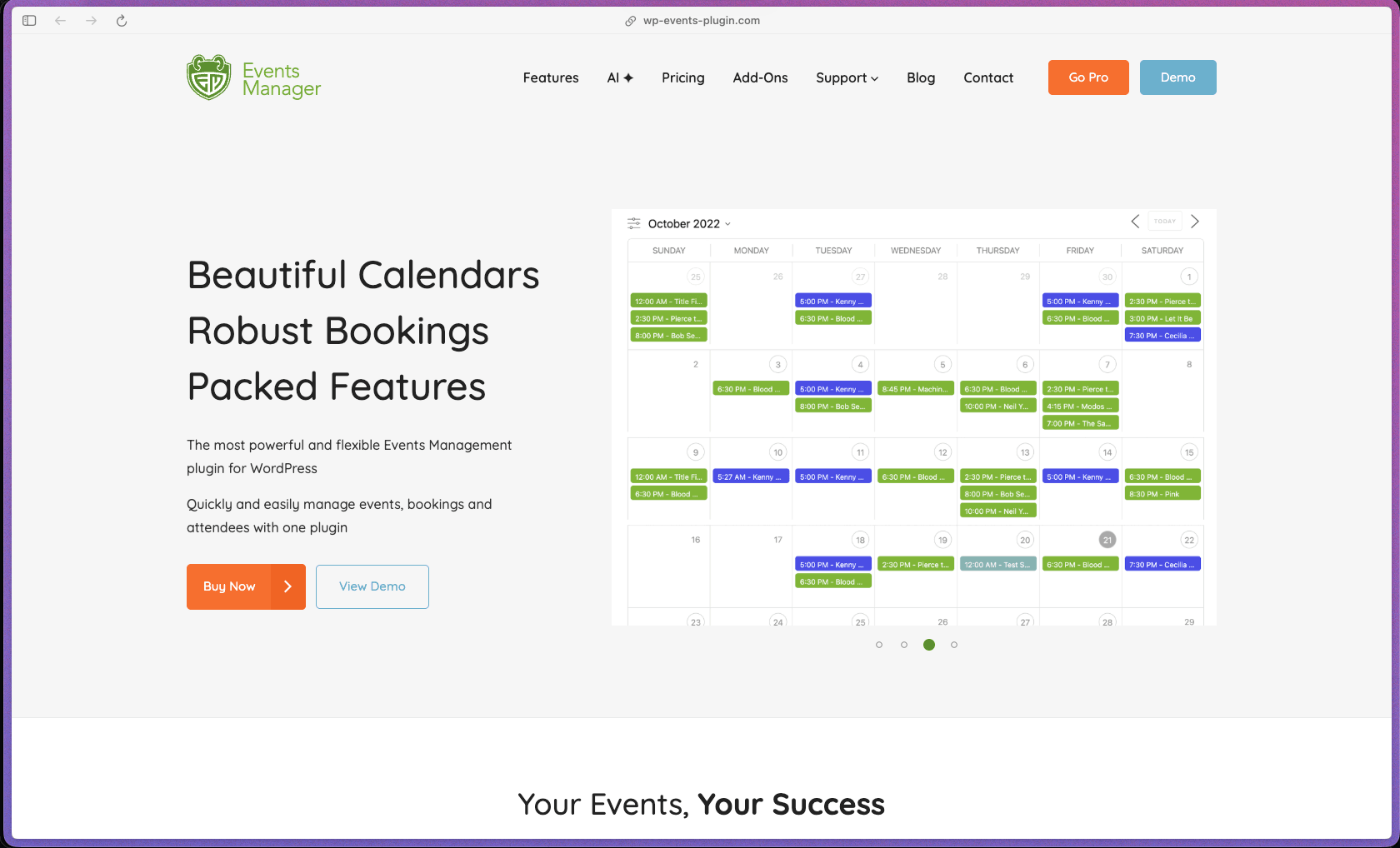
Events Manager is one of the most feature-dense WordPress event plugins available in both free and paid versions—covering the full event lifecycle from listing and registration through payment collection, PDF ticket delivery, QR code check-in, and post-event SMS/WhatsApp/Telegram follow-up, all within a single plugin ecosystem. The free version on WordPress.org is genuinely usable for events that don't require payment—a rarity in a plugin category where most "free" versions are essentially demo versions with critical functionality withheld. With 70,000+ active installations, a WordPress.org listing updated as recently as June 23, 2026, and 540 reviews averaged at 4.2/5, it has the production track record of a tool that has handled real-world event management at scale for many years.
Events Manager uses an open-core model—a permanently free version is available on WordPress.org with core event management and basic booking functionality, while the Pro version (annual subscription) unlocks paid ticketing, custom booking forms, PDF tickets, coupons, SMS/WhatsApp messaging, automation triggers, and import/export tools. Pro Plus plans bundle all features including add-ons into a single annual subscription, while individual Pro add-ons are also available as separate purchases for teams who only need specific extensions.
Refund policy not specified on the official site. Buyers should contact the Events Manager team directly at wp-events-plugin.com before purchasing to confirm the current refund or trial terms.
Events Manager is "mature/established"—with roots going back to approximately 2009 and a current active installation base of 70,000+ WordPress sites, it is one of the oldest continuously maintained WordPress event management plugins in the ecosystem. The plugin's WordPress.org listing was updated on June 23, 2026, and the official changelog confirms a pattern of regular versioned updates—indicating ongoing active development rather than a maintained-but-frozen codebase. The Pro plugin ecosystem includes dedicated add-ons for SMS/WhatsApp/Telegram messaging, QR code check-in, PDF ticketing, Zapier automation, WooCommerce checkout integration, and Google Calendar/Meetup.com import—a breadth of add-on coverage that reflects years of iterative feature expansion in response to user demand.
- Rated 4.2 out of 5 on WordPress.org from 540 reviews, with 383 of those being 5-star ratings—indicating a strong majority positive experience despite a vocal minority of critical reviews.
- Over 70,000 active installations on WordPress.org, with the plugin listed as updated on June 23, 2026, confirming active maintenance through mid-2026.
- AutomagicWP assigns Events Manager a C+ health score, primarily reflecting a low support resolution rate (6%) on the WordPress.org public forum—a signal that buyers should factor in when evaluating the free version's support expectations versus Pro forum support.
- The plugin has been available on WordPress.org since 2009 (based on the documentation page copyright year), giving it over 15 years of community use and a large installed base of long-term users—one of the longest track records in the WordPress events plugin category.
- Independent reviews from WisdmLabs, Liquid Web, and Elegant Themes blog include Events Manager in roundups of recommended WordPress event plugins, reflecting consistent third-party editorial endorsement across multiple years.
- Event creation supports one-time, recurring (daily, weekly, monthly, custom interval), and multi-date event formats—covering everything from a single workshop to a weekly class series to a year-long recurring meetup from a single event record without duplicate event entries.
- Flexible event display options include responsive calendar views, full-sized calendar, event list, grid layout, map-based event display, and grouped listings—allowing you to present events in the format that best fits your site's content structure without custom templates.
- Multiple ticket types with per-ticket capacity, pricing, and date-based availability let you offer Early Bird, General Admission, and VIP tickets on the same event—each with its own stock limit and sales window—without creating separate events per ticket tier.
- Waitlist management automatically queues attendees when an event reaches capacity—notifying waitlisted registrants when a space opens up rather than requiring manual monitoring of registrations and follow-up emails to waitlisted attendees.
- Guest booking support allows attendees to register for events without creating a WordPress account—reducing the registration friction that causes drop-off from attendees who don't want to create yet another website login.
- Attendee check-in with QR code scanning (Pro) enables real-time attendance tracking on event day—using a mobile device to scan PDF ticket QR codes at entry, with the check-in status updating live in the WordPress admin without a separate check-in app.
- Front-end event submission and management allows community members, logged-in users, or guests (with permission controls) to create and manage their own events from a page on your site—without accessing the WordPress admin area, making it suitable for community event directory sites.
- Location and venue management creates reusable location records attached to multiple events—supporting both physical venues with Google Maps display and online event URLs (including Zoom meeting links), so location data doesn't need to be re-entered for recurring venues.
- PayPal integration (Express and Advanced) supports direct PayPal checkout for event ticket purchases—covering both PayPal Standard wallet payments and PayPal Advanced card-on-site processing without redirecting buyers to the PayPal site.
- Stripe integration (Checkout and Elements) processes credit card payments natively for event bookings—supporting both Stripe's hosted Checkout redirect and Stripe Elements embedded card form within your own WordPress pages.
- Authorize.net payment gateway support extends payment method coverage to merchants who already use Authorize.net as their primary payment processor—avoiding the need to set up a new processor account for event ticketing.
- WooCommerce integration (sold separately on WooCommerce.com) allows event bookings to be added to a WooCommerce cart alongside regular product purchases—processing everything through a single WooCommerce checkout and enabling use of all WooCommerce payment methods including Apple Pay, Google Pay, and any WooCommerce gateway extension.
- Zoom Meetings and Webinars integration connects Events Manager bookings to Zoom—automatically generating a Zoom meeting or webinar link for online events and providing registrants with their unique access link upon booking confirmation.
- Google Calendar import and export synchronizes event data between your WordPress site and Google Calendar—keeping your site's event listings consistent with a Google Calendar source without manual duplication.
- iCal, CSV, Excel, Google Sheets, Facebook Events (import limited), and Meetup.com are all supported as import/export sources through the Events Manager I/O add-on—with automated scheduled syncing options available.
- Zapier, Microsoft Power Automate, and other automation middleware platforms connect Events Manager events and booking triggers to external tool workflows—without requiring custom API development.
- BuddyPress integration enables group event management—allowing BuddyPress group members to create and manage events within their group context, suitable for community social network sites.
- Automated booking email system sends confirmation, cancellation, rejection, and reminder emails to attendees—with event-specific, gateway-specific, and global email templates customizable per-event, reducing the manual communication work involved in managing a large event calendar.
- RSVP automated policies enforce configurable rules for booking status management—automatically approving, canceling, or rejecting bookings based on defined conditions (payment status, booking cutoff time, capacity thresholds) without manual review of each incoming booking.
- Automation trigger system (Pro) allows custom workflows to fire based on event start/end times, booking status changes, and new registration events—with actions including email sends, webhook calls, and Zapier/Power Automate triggers.
- Cancellation cut-off time enforcement automatically closes the self-cancellation window before the event starts—preventing last-minute cancellations that leave unsellable empty seats without requiring manual policy enforcement.
- SMS, WhatsApp, and Telegram messaging (Pro) allows booking confirmations and event reminders to be sent via messaging apps—covering attendees who are more likely to read a WhatsApp or SMS message than an email.
- Booking management dashboard shows all registrations per event with attendance status, payment status, ticket type, and attendee details—filterable and exportable to CSV for offline reporting, financial reconciliation, or attendee check-in list printing.
- Transaction history tracks the complete payment record for each booking—including payment method, gateway reference, amount, and payment status—providing an audit trail for booking-level financial reconciliation without accessing the payment gateway dashboard.
- Capacity management displays current registration counts against ticket stock limits per ticket type in real time—allowing event managers to monitor approaching sellout status from the WordPress admin without running a manual count.
- Placeholder-based template system allows front-end event display formatting to be configured entirely through the plugin settings panel using placeholder tokens—without editing PHP theme files or template files on the server, making visual customization accessible to non-developers.
- Custom event fields extend standard event data with additional fields specific to your use case—adding speaker names, sponsors, dress code, age restrictions, or any other event attribute—which can be displayed on the front end using the placeholder system.
- Custom booking forms with per-attendee custom fields allow you to collect structured data from each registrant at booking time—capturing shirt size, dietary preference, company name, or any custom attendee attribute alongside the standard booking fields.
- Shortcodes and widgets allow event calendars, event lists, and search forms to be placed on any page or post with configurable filter parameters—controlling which events display, in what order, and with what search options available to visitors.
- User permission and capability controls define which WordPress user roles can create, edit, or manage events—allowing you to run a multi-organizer event directory where different users manage only their own events without admin access.
- Coupons and discount manager (Pro) creates percentage or fixed-amount booking discount codes with usage limits, date restrictions, and per-event or per-ticket applicability—supporting promotional discount campaigns for upcoming events.
- reCAPTCHA spam protection is available on booking forms—reducing automated spam registrations and bot-submitted bookings without requiring a separate anti-spam plugin.
- Submission throttling by time interval allows you to limit how frequently a single user can submit events via front-end submission forms—preventing submission flooding by a single account or IP address.
- WordPress user account integration enforces authentication requirements for booking (if guest bookings are disabled)—ensuring all booking records are tied to verified WordPress accounts rather than anonymous form submissions.
- Community organizations, meetup groups, and nonprofits running a WordPress site who need a free event calendar with RSVP registration, Google Maps venue display, and iCal feed sharing—without paid ticketing infrastructure.
- WordPress developers building event directory sites for clients who need front-end event submission, multi-user organizer permissions, and flexible placeholder-based template customization without editing PHP files.
- Conference and seminar organizers running paid ticketed events on WordPress who need multiple ticket tiers, coupon codes, PayPal or Stripe payment processing, PDF ticket delivery, and QR code check-in in a single plugin.
- Fitness studios, yoga centers, and class-based businesses with weekly recurring classes that need a registration system with capacity limits, automated booking confirmation emails, and customer self-cancellation windows.
- Event venue operators and multi-organizer community platforms who need BuddyPress group event management, recurring event scheduling, and per-event email customization managed from a single WordPress installation.
- Use it for managing paid ticket sales on a WordPress site when you need multiple ticket tiers (Early Bird, General, VIP), Stripe or PayPal payment processing, automated PDF ticket delivery, and QR code check-in on event day.
- Use it for building a community event directory when you want members or guests to submit their own events through a front-end form, with per-role submission permissions and admin review before publication.
- Use it for running recurring classes or workshops when you need a single event record to generate weekly or monthly instances with individual capacity limits and per-instance attendance tracking.
- Use it for syncing events between your WordPress site and Google Calendar or Meetup.com when you manage event listings in multiple places and want them to stay consistent through automated scheduled imports or exports.
- Use it for online event management with Zoom when you want event registrants to receive an automated Zoom meeting or webinar link in their booking confirmation email—without manually creating Zoom invitations and emailing them to each registrant.
- Use it for sending SMS or WhatsApp booking reminders when you want to notify registrants of upcoming events through mobile messaging channels rather than relying solely on email confirmation follow-ups.
- WordPress plugin (self-hosted)—requires WordPress 6.0+ and PHP 7.4+; the free Events Manager version is installable directly from the WordPress.org plugin repository; Pro is installed via manual upload of the downloaded plugin file after license purchase.
- Compatible with standard self-hosted WordPress hosting environments (shared, VPS, managed WordPress, dedicated server); no proprietary hosting environment is required.
- Payment gateway integrations: PayPal (Express and Advanced), Stripe (Checkout and Elements), Authorize.net, and manual/offline payments—all configured from the WordPress admin without third-party connector tools.
- WooCommerce integration available as a separately purchased add-on on WooCommerce.com—extends payment method coverage to all WooCommerce gateways and allows event bookings to be processed within a shared WooCommerce cart.
- Zoom integration (Pro) supports Zoom Meetings, Webinars, and Rooms with automated link generation on booking confirmation.
- Import/export sources supported: iCal (import), CSV, Excel, Google Sheets, Google Calendar, Facebook Events (import limited), and Meetup.com—with automated scheduled sync available through the Events Manager I/O add-on.
- Compatible with Zapier, Microsoft Power Automate, and automation middleware platforms via webhook support for booking and event trigger events.
- BuddyPress compatibility enables group event management for community and social network site configurations.
Events Manager's closest direct competitors are The Events Calendar (Tribe Events Calendar), Modern Events Calendar, and Eventin—all covering event display, registration, and ticketing for WordPress. Events Manager's key differentiator is that its free version is meaningfully functional for non-paid events (including capacity management, recurring events, custom event fields, front-end submission, and Google Maps)—while many competing plugins withhold recurring events or capacity management from the free tier, pushing users toward paid plans earlier. For WordPress developers specifically, the placeholder-based template customization system and extensive hook library make Events Manager the most directly code-customizable option in the category—a recognized strength in independent reviews going back several years.
- Pro plan holders have access to dedicated Pro support forums at wp-events-plugin.com, separate from the public WordPress.org forum; free version users are supported through the public WordPress.org forum, which AutomagicWP tracks at a 6% support resolution rate—a notably low figure that indicates the public forum should not be relied on as a primary support channel for the free version.
- Documentation at wp-events-plugin.com/documentation covers event creation, recurring events, booking setup, location management, payment gateways, Zoom integration, import/export, shortcodes, placeholder formatting, custom fields, and developer API—structured with both user-facing setup guides and advanced developer documentation for PHP/theme customization.
- No official Discord, community forum (beyond Pro support forums), or Facebook group is prominently listed; peer community discussion occurs primarily through the WordPress.org support forum threads—which, based on the 6% resolution rate, should be considered a supplementary rather than primary support resource for the free version.
- The WooCommerce integration that enables use of all WooCommerce payment gateways (Apple Pay, Google Pay, and 100+ additional payment methods) is sold separately on WooCommerce.com—it is not included in the standard Events Manager Pro subscription and requires an additional purchase.
- AutomagicWP's plugin health tracker assigns Events Manager a C+ health score, primarily due to a 6% support resolution rate on the public WordPress.org forum—buyers relying on free version support should factor this into their evaluation, particularly for production sites where support responsiveness matters.
- Some recent WordPress.org reviewers report site compatibility issues following specific version updates (notably noted around version 7.3)—a pattern worth monitoring; buyers should confirm compatibility with their active theme and plugin stack before upgrading on production sites.
- The placeholder-based template customization system—while powerful and noted positively by developers—requires some familiarity with the placeholder syntax to fully leverage; buyers expecting a fully visual drag-and-drop layout editor will need to learn the templating system or work with a developer for complex layout customizations.
Related Products
Elementor

Recently Added!
Crocoblock

Recently Added!
LearnDash

Recently Added!
BitFlows

Amelia

Recently Added!
Dynamic.ooo

Recently Added!
Microthemer & Amender

Recently Added!
LifterLMS

Recently Added!
Masteriyo

Products With Lifetime Deals
Recently Added!
FluentForms

Recently Added!
Divi Theme

Recently Added!
ConvertPro

Recently Added!
CartFlows

Recently Added!
Bullet Proof Security

Recently Added!
WP Booking Calendar

Recently Added!
BeaverBuilder

Recently Added!
Avada

Recently Added!
Independent Analytics

You Recently Viewed These
Recently Viewed
BitFlows
Recently Viewed
Amelia
Recently Viewed
Dynamic.ooo
Recently Viewed
Microthemer & Amender
Recently Viewed
LifterLMS
Recently Viewed
Masteriyo
Recently Viewed
Zynith SEO

Recently Viewed
Wrike

Recently Viewed
WPMU Dev

Recently Viewed
wpDataTables

Recently Viewed
WP Booking Calendar
Recently Viewed
Webflow
